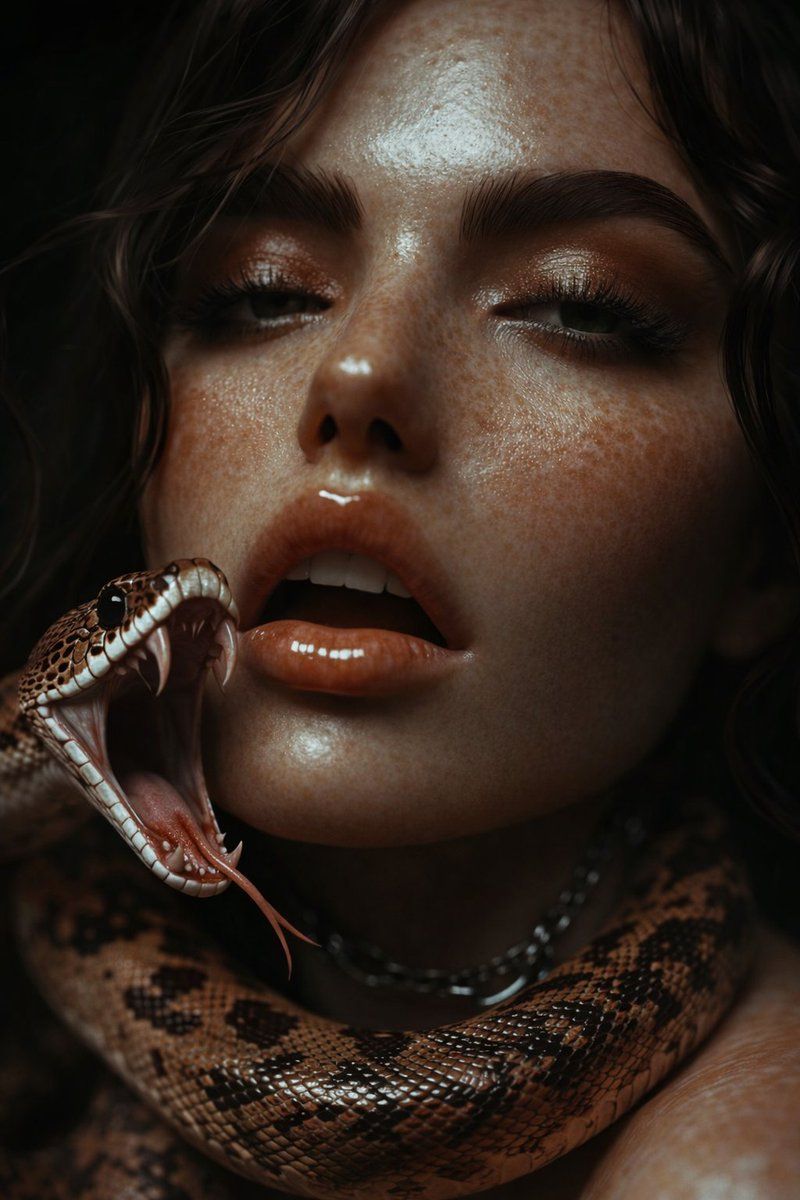
超逼真光泽人像与蛇提示词
Prompt
{
  "image_type": "photorealistic digital portrait",
  "resolution_target": "8K UHD",
  "aspect_ratio": "vertical (portrait orientation)",
  "framing": {
    "crop": "tight close-up",
    "composition": "face centered slightly left, shoulders visible, subject filling most of the frame"
  },
  "subject": {
    "gender_presentation": "female-presenting",
    "age_range_visual": "young adult",
    "face": {
      "skin_tone": "warm light-to-medium brown",
      "skin_texture": "highly detailed, visible pores, strong glossy sheen",
      "freckles": "dense freckles across forehead, cheeks, nose bridge, and upper cheeks",
      "finish": "wet, reflective, metallic-like glow",
      "jawline": "soft, rounded",
      "cheekbones": "subtle but defined by lighting"
    },
    "eyes": {
      "color": "light green-gray",
      "gaze_direction": "looking directly at camera",
      "eyelashes": "long and defined",
      "eyelids": "slightly glossy, minimal visible makeup",
      "expression": "neutral, calm, intense"
    },
    "eyebrows": {
      "color": "dark brown",
      "shape": "full, natural, well-defined arch"
    },
    "nose": {
      "shape": "straight bridge, softly rounded tip",
      "surface": "glossy highlight on bridge and tip"
    },
    "lips": {
      "color": "natural muted nude",
      "texture": "glossy, reflective",
      "position": "slightly parted"
    },
    "hair": {
      "color": "dark brown",
      "texture": "curly / wavy",
      "volume": "thick, natural",
      "placement": "frames face, falls loosely around forehead and sides"
    }
  },
  "snake": {
    "position": "coiled around the subject’s neck and shoulder",
    "head_location": "resting near the subject’s left cheek",
    "scale_texture": "highly detailed, glossy, visible scale pattern",
    "coloration": {
      "primary": "brown",
      "secondary": "dark brown and black markings",
      "underside": "lighter beige/cream scales"
    },
    "eyes": "black, reflective",
    "surface_finish": "shiny, wet-looking"
  },
  "lighting": {
    "type": "low-key studio lighting",
    "direction": "soft directional light from front-left",
    "highlights": "strong specular highlights on skin and snake scales",
    "shadows": "deep shadows with smooth falloff"
  },
  "background": {
    "color": "deep black",
    "detail": "no visible texture or elements",
    "depth": "fully blurred / void-like"
  },
  "color_palette": {
    "dominant_colors": [
      "warm browns",
      "copper highlights",
      "dark shadows",
      "black background"
    ]
  },
  "camera_details": {
    "perspective": "eye-level",
    "lens_effect": "shallow depth of field",
    "focus": "sharp focus on eyes, face texture, and snake head"
  },
  "style_attributes": {
    "realism_level": "hyper-realistic",
    "detail_level": "extreme micro-detail",
"surface_quality": "high contrast, glossy, cinemat"- Category
- 创意图片
- Model
- Nano Banana Pro
- Creator
- ShaHid WaNii
- Source ID
- e1c26883-62ec-404f-8c66-d29d1231c335
- Published
- Mar 8, 2026
Views0
















