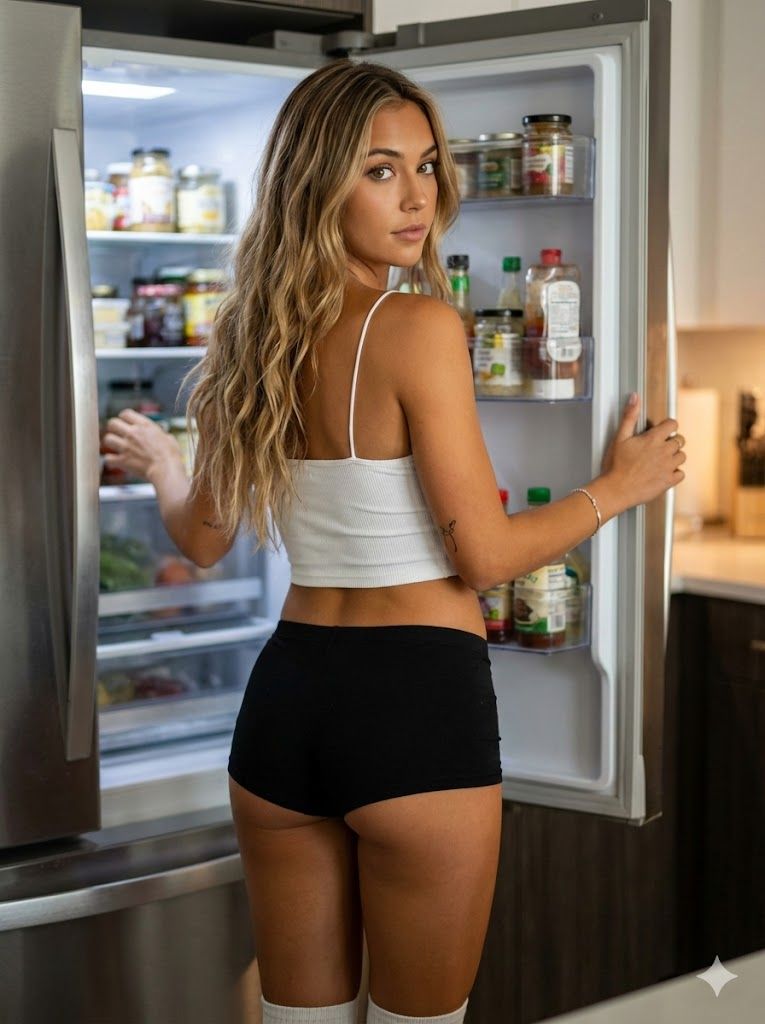
冰箱灯下的厨房抓拍
Prompt
{
  "prompt_type": "photorealistic_portrait",
  "subject_details": {
    "demographics": "Young female, early 20s, slender and fit physique.",
    "skin": {
      "tone": "Warm tan with olive undertones, sun-kissed.",
      "texture": "Smooth, high fidelity skin texture, realistic shading.",
      "special_markers": "Small, minimal tattoo on the back of the left upper arm (tricep area)."
    },
    "hair": {
      "color": "Dirty blonde to light brown roots fading into honey blonde highlights (balayage/ombre style).",
      "style": "Long, loose beach waves extending down the back to waist level.",
      "parting": "Middle part."
    },
    "facial_features": {
      "shape": "Oval face shape with a soft jawline.",
      "eyes": "Large, almond-shaped, brown/hazel color, looking directly at the viewer over the left shoulder.",
      "eyebrows": "Natural shape, well-groomed, slightly arched.",
      "nose": "Straight bridge, petite button nose.",
      "lips": "Natural pink shade, slightly plump, closed in a neutral, relaxed expression.",
      "cheeks": "Subtle contouring, natural flush.",
      "expression": "Neutral, alluring, calm, direct eye contact."
    }
  },
  "attire": {
    "top": "White, tight-fitting cropped camisole/tank top with thin spaghetti straps, ribbed texture.",
    "bottom": "Black tight-fitting boy-short style underwear or lounge shorts.",
    "accessories": "Thin silver bracelet on the right wrist.",
    "footwear": "White knee-high socks (visible only at the very bottom frame)."
  },
  "pose_and_action": {
    "stance": "Standing facing away from the camera, body angled slightly towards the right.",
    "head_position": "Turned back over the left shoulder to face the camera.",
    "hands": "Right hand holding the refrigerator door edge; Left hand reaching inside the fridge.",
    "framing": "Medium-long shot (from knees up)."
  },
  "environment": {
    "setting": "Modern home kitchen.",
    "key_object": "Large, modern stainless steel refrigerator with the door wide open.",
    "background_details": "Interior of fridge illuminated with LED light, stocked with various jars, bottles, and condiments on glass shelves and door racks. Background behind the fridge is a blurred kitchen counter.",
    "lighting": "Cool white LED lighting coming from inside the refrigerator illuminating the subject's front; softer ambient warm lighting from the room illuminating her back and hair.",
    "shadows": "Soft shadows cast on her back due to the fridge light source."
  },
  "technical_specs": {
    "style": "Candid lifestyle photography, influencer style.",
    "camera_angle": "Eye-level.",
    "focus": "Sharp focus on the subject's face and eyes, slight bokeh/blur on the background elements inside the fridge.",
    "aspect_ratio": "3:4 (Vertical Portrait).",
    "color_grading": "Natural, slightly warm tones, high contrast."
  }
}- Category
- 创意图片
- Model
- Nano Banana Pro
- Creator
- sammy
- Source ID
- 1dc6ea2f-522c-42be-9d54-6e23cba25767
- Published
- Mar 8, 2026
Views0



















