19

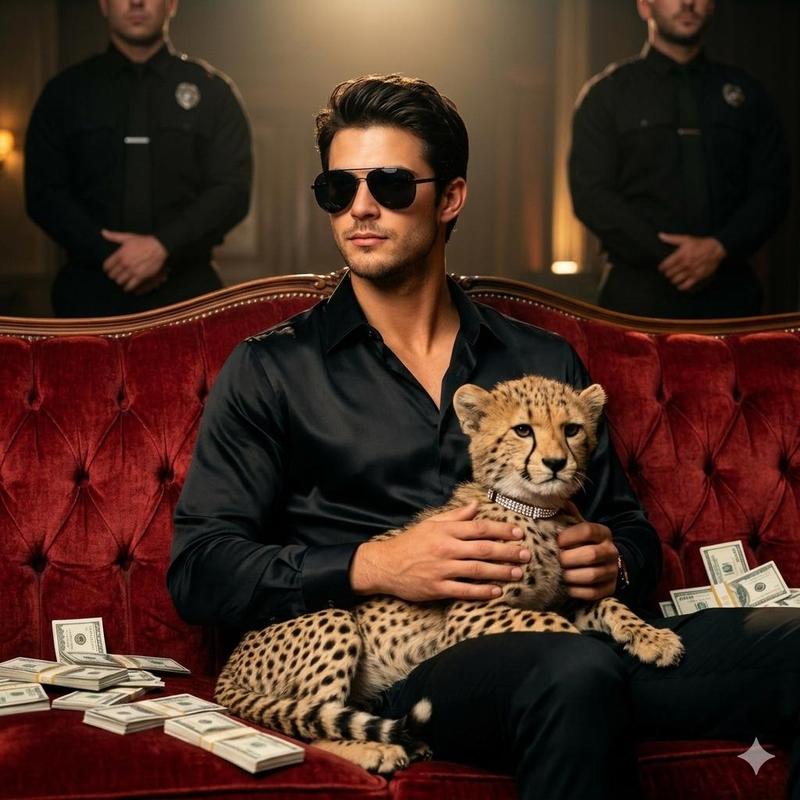
带猎豹肖像的霸气黑帮老大提示
Enlarge

带猎豹肖像的霸气黑帮老大提示

Prompt
GENERATE A POWERFUL AND STYLISH IMAGE OF THE UPLOADED MAN, 100 PERCENT FACE RESERVED, RADIATING BOSSY GANGSTER VIBES. HE IS SEATED CONFIDENTLY ON A LUXURIOUS VELVET SOFA, LEANING BACK IN A RELAXED YET COMMANDING POSE. A CHEETAH, ADORNED WITH HEAVY GOLD CHAINS, SITS ACROSS HIS LAP, ITS SLEEK BODY DRAPED NATURALLY OVER HIM.

THE MAN'S HEAD IS TURNED SLIGHTLY DOWNWARD, GAZING AT THE CHEETAH WITH A COOL, COMPOSED EXPRESSION, SUNGLASSES ENHANCING HIS AURA OF DOMINANCE AND STYLE. ONE HAND RESTS CASUALLY ON THE CHEETAH'S BACK WHILE THE OTHER RESTS ALONG THE ARM OF THE SOFA, SHOWING BOTH CONTROL AND EASE.

HE IS DRESSED IN HIGH-FASHION DARK ATTIRE - EITHER A PINSTRIPE SUIT OR AN OPEN-COLLARED SILK SHIRT LAYERED WITH BOLD GOLD JEWELRY. THE CHEETAH HAS A FIERCE, OPEN-MOUTH EXPRESSION, MIRRORING THE MAN'S AURA OF RAW POWER.
Category
创意图片
Model
Nano Banana Pro
Creator
Gravity X
Views0
Source ID
a7800635-0403-4bd3-b332-7026ffa69fcd
Published
Mar 8, 2026

Guide

About "带猎豹肖像的霸气黑帮老大提示"

What is this prompt for?

"带猎豹肖像的霸气黑帮老大提示" AI image prompt for Nano Banana Pro (创意图片). 生成一张强劲、时尚的图像,描绘一位散发着“霸道黑帮大佬气质”的男士,他坐在一张天鹅绒沙发上。关键元素是一只猎豹,它慵懒地趴在他的腿上,身上佩戴着沉重的金链,这与男士的高级定制深色服装形成鲜明对比,…

The full copyable prompt and example visuals above are ready for AI image generation or one-click recreate in Picva.

How to use this prompt

  1. Step 1

    Open the prompt detail

    Review the example visuals, category, and full prompt text for "带猎豹肖像的霸气黑帮老大提示".

  2. Step 2

    Copy the prompt

    Copy the prompt body from this page, or load it directly in Studio.

  3. Step 3

    Pick a model (Nano Banana Pro)

    Prefer Nano Banana Pro. If you switch models, keep subject and composition and tweak style terms.

  4. Step 4

    Generate and export

    Recreate the look in Picva, or export into your workflow for editing and publishing.

FAQ

What is the "带猎豹肖像的霸气黑帮老大提示" prompt?
It is an AI image-generation prompt for Nano Banana Pro in the 创意图片 category. This page includes the full prompt text, example visuals, and a one-click recreate path in Picva.
How do I use this prompt to generate an image?
Copy the prompt from this page, or use Generate / Studio. Paste it into a compatible image model, or recreate the look in Picva with optional reference images.
Which model is this prompt for?
This page lists Nano Banana Pro. Most descriptive prompts also transfer to nearby image models such as GPT Image, Flux, or Midjourney with light style tweaks.
Can I use the result commercially?
You can usually copy the prompt for creation, but commercial use of the final image depends on the model terms, reference-image rights, and the generated content. Follow the source author and platform rules.