20

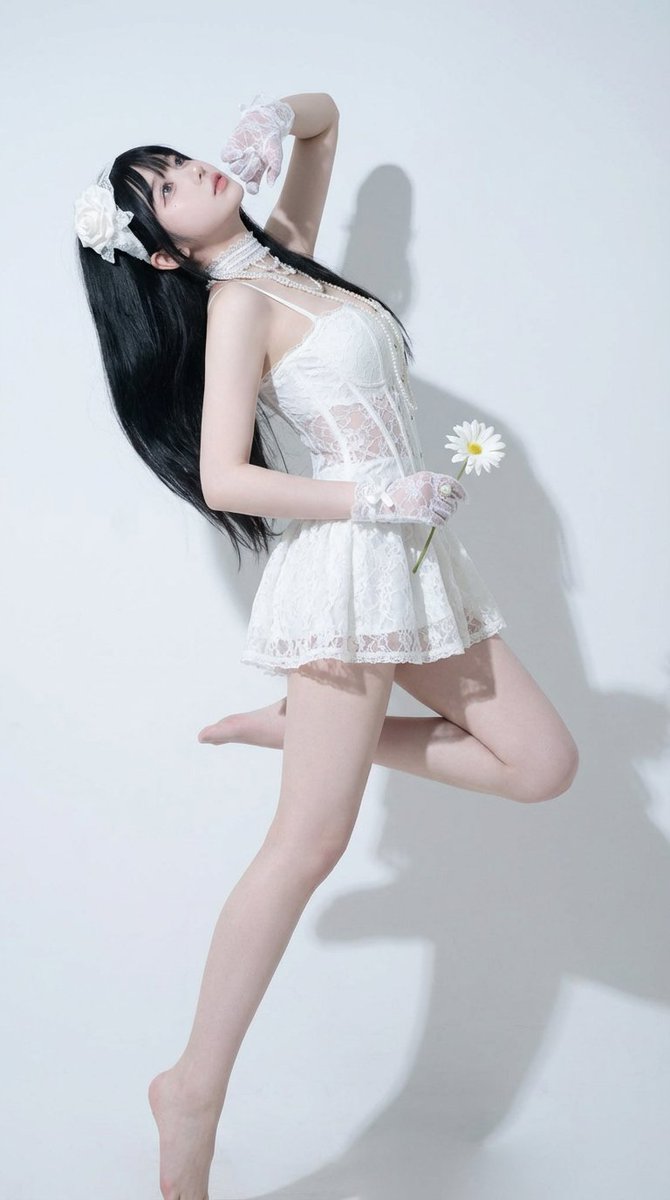
这个提示词就是为复刻高难度动作而生的,图一为生成结果,图二为参考图 使用方法(Nano Banana Pro): 1️⃣上传原图 2️⃣上传动作参考图 3️⃣粘
Enlarge

Example images

这个提示词就是为复刻高难度动作而生的,图一为生成结果,图二为参考图 使用方法(Nano Banana Pro): 1️⃣上传原图 2️⃣上传动作参考图 3️⃣粘

Prompt
这个提示词就是为复刻高难度动作而生的,图一为生成结果,图二为参考图

使用方法(Nano Banana Pro):
1️⃣上传原图
2️⃣上传动作参考图
3️⃣粘贴提示词

✍️中文提示词:
一、核心目标与强约束
1 姿势精确复刻:以图二为姿势唯一参考,将图一人物的全身姿势进行“逐点对齐”复刻(头、颈、肩、胸、髋、膝、踝、手臂、手腕、手指的朝向与弯曲程度一致)。
2 视角与镜头一致:相机机位、拍摄角度、镜头高度、俯仰角、左右偏转角、透视关系、景深效果与图二一致。
3 构图一致:人物在画面中的位置、占比、留白比例、裁切方式(是否截到脚/头顶/手)与图二一致。
4 头部与视线一致:头部倾斜角度、下巴抬/收程度、视线方向与图二一致。
5 外观禁止改动:严格保留图一人物的身份特征与风格(脸型五官、发型发色、肤色、服装款式与颜色、材质、配饰、纹理、体型比例、年龄气质、画风/渲染风格),只改变姿势与镜头构图以匹配图二。

二、执行方式与校准要求
1 对齐方法:以图二人物骨架为“目标骨架”,将图一人物骨架“重定向”到目标骨架;四肢角度、重心位置、躯干扭转幅度必须匹配。
2 关键点优先级:先匹配重心与骨盆朝向,再匹配躯干旋转与肩线,再匹配四肢末端(手、脚),最后微调手指与表情细节。
3 允许变化范围:姿势与镜头的误差尽可能为0;若不可避免,误差必须极小且不可肉眼明显。
4 禁止项:禁止新增或删除物体;禁止改变服装造型与细节;禁止改变人物风格;禁止换背景风格导致构图变化;禁止把图二人物的外观特征迁移到图一人物身上。
Category
creative_scene
Model
Nano Banana Pro
Creator
Pixshop
Views51
Source ID
81261da5-763e-4683-bd21-ba31377274cb
Published
Jan 12, 2026

Guide

About "这个提示词就是为复刻高难度动作而生的,图一为生成结果,图二为参考图 使用方法(Nano Banana Pro): 1️⃣上传原图 2️⃣上传动作参考图 3️⃣粘"

What is this prompt for?

"这个提示词就是为复刻高难度动作而生的,图一为生成结果,图二为参考图 使用方法(Nano Banana Pro): 1️⃣上传原图 2️⃣上传动作参考图 3️⃣粘" AI image prompt for Nano Banana Pro (creative_scene). creative_scene Copy it…

The full copyable prompt and example visuals above are ready for AI image generation or one-click recreate in Picva.

How to use this prompt

  1. Step 1

    Open the prompt detail

    Review the example visuals, category, and full prompt text for "这个提示词就是为复刻高难度动作而生的,图一为生成结果,图二为参考图 使用方法(Nano Banana Pro): 1️⃣上传原图 2️⃣上传动作参考图 3️⃣粘".

  2. Step 2

    Copy the prompt

    Copy the prompt body from this page, or load it directly in Studio.

  3. Step 3

    Pick a model (Nano Banana Pro)

    Prefer Nano Banana Pro. If you switch models, keep subject and composition and tweak style terms.

  4. Step 4

    Generate and export

    Recreate the look in Picva, or export into your workflow for editing and publishing.

FAQ

What is the "这个提示词就是为复刻高难度动作而生的,图一为生成结果,图二为参考图 使用方法(Nano Banana Pro): 1️⃣上传原图 2️⃣上传动作参考图 3️⃣粘" prompt?
It is an AI image-generation prompt for Nano Banana Pro in the creative_scene category. This page includes the full prompt text, example visuals, and a one-click recreate path in Picva.
How do I use this prompt to generate an image?
Copy the prompt from this page, or use Generate / Studio. Paste it into a compatible image model, or recreate the look in Picva with optional reference images.
Which model is this prompt for?
This page lists Nano Banana Pro. Most descriptive prompts also transfer to nearby image models such as GPT Image, Flux, or Midjourney with light style tweaks.
Can I use the result commercially?
You can usually copy the prompt for creation, but commercial use of the final image depends on the model terms, reference-image rights, and the generated content. Follow the source author and platform rules.