Posters & TypographyPromptsref图片posters-typography海报与排版
Vertical 9:16, minimalist white cosplay outfit information page, generous white
Prompt
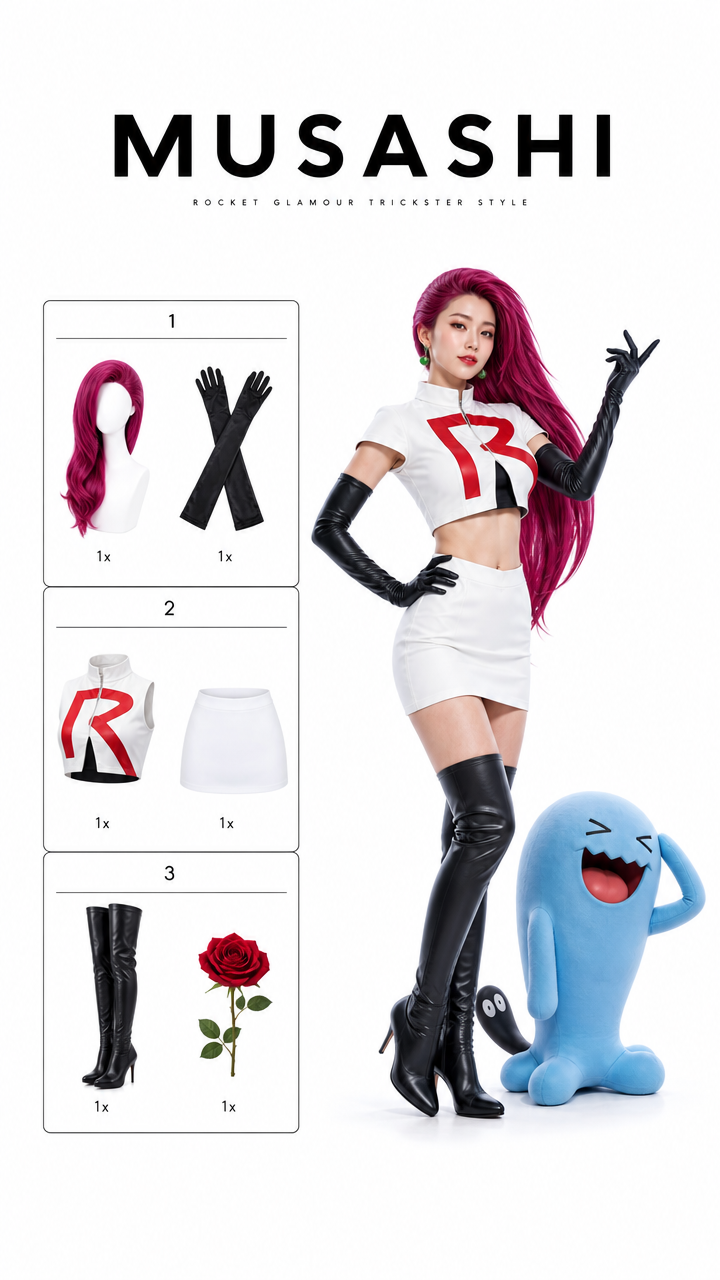
Vertical 9:16, minimalist white cosplay outfit information page, generous white empty space at the top and bottom, pure white photography studio background, bright high-key soft lighting, realistic commercial studio photography, premium fashion magazine catalog layout, clean and restrained.

At the top, a large bold black title reads: “MUSASHI”. Under the title, add a very small refined subtitle: “ROCKET GLAMOUR TRICKSTER STYLE”.

The left side is a unified black thin-line bordered outfit and accessory checklist, fixed into 3 numbered sections. Each section contains exactly 2 product cutouts, six product cutouts total: Section 1: long magenta wig with dramatic side sweep and black elbow gloves; Section 2: cropped white high-fashion rocket uniform top with red emblem-inspired abstract letter shape and white mini skirt; Section 3: black thigh-high boots and red rose accessory. Each item is shown as a clean white-background product cutout, with a small “1x” quantity label below each product.

On the right side, a clearly adult Asian female fashion blogger stands full-body wearing a luxury fashion reinterpretation of Musashi from Pokemon: long vivid magenta hair swept dramatically to one side, fitted cropped white uniform top, sleek white mini skirt, black opera gloves, black thigh-high boots, sharp red graphic detail on the chest, elegant villainous runway styling. Preserve the recognizable identity: magenta hair, white rocket uniform, black gloves and boots, theatrical confidence, mischievous villain-team aura. She poses with one hand on her waist and the other raised elegantly, chin lifted, confident and dramatic.

Beside her on the right lower area, place one realistic Wobbuffet-inspired blue companion creature, standing slightly behind her boots, rubbery blue skin texture, simple expressive face, rounded body, small arms, black tail with tiny eyes, soft studio shadow, believable creature anatomy but still cute and recognizable. The creature should look realistic, not like a flat cartoon.

Avoid cheap plastic cosplay, exaggerated anime filter, bad text, crowded layout, distorted body proportions, messy background, unofficial messy logo marks, and placing the character or creature too close to the bottom edge. --ar 9:16
- Category
- Posters & Typography
- Model
- GPT Image 2
- Creator
- xie underwood
- Source language
- en
- Source ID
- 17005
- Published
- Jun 6, 2026
Views354