19

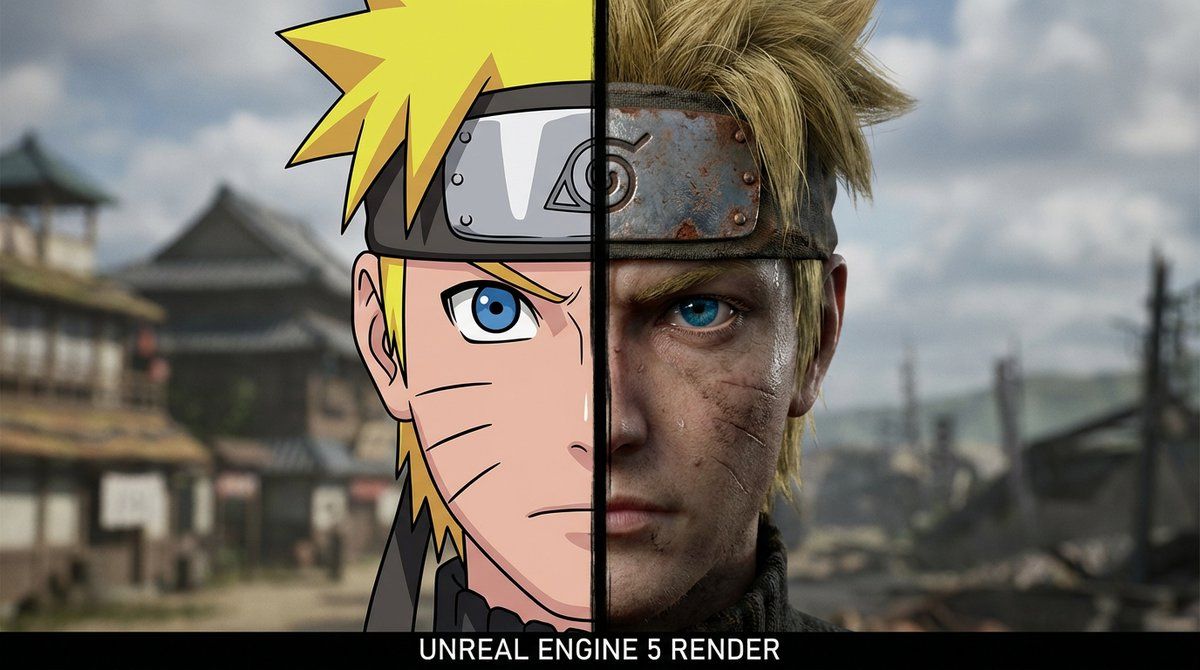
动漫与现实分割肖像
Enlarge

动漫与现实分割肖像

Prompt
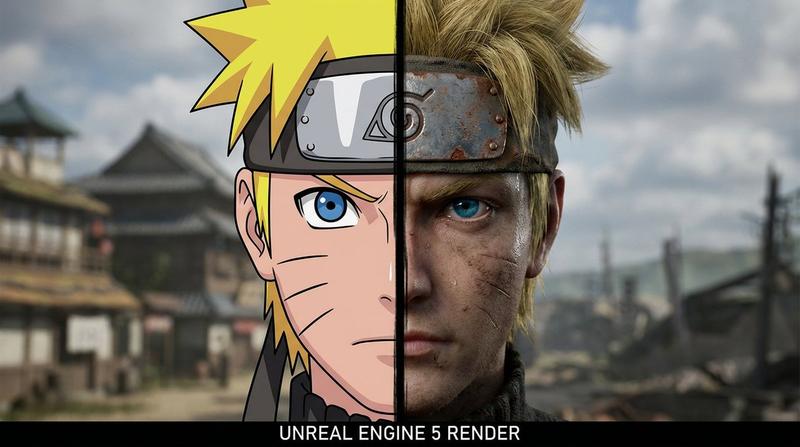
A cinematic 16:9 wide shot featuring a single centered headshot of Naruto Uzumaki, face split vertically in half. A distinct black line separates the two art styles down the center. [LEFT HALF]: Classic anime style, bright blonde spiky hair, blue anime eye, black whisker marks, metal headband with bold lines. [RIGHT HALF]: Gritty realism, realistic dirty blonde textured hair, piercing blue human eye, whisker marks as faint scars, weathered metal texture on the headband with rust. The headband and facial features align perfectly to form a single, unified character portrait, rendered in Unreal Engine 5.
一张16:9的电影式宽屏镜头,画面中央是漩涡鸣人的头像,脸部被垂直分割成两半。一条清晰的黑线将两种不同的画风从中间分开。[左半边]:经典的动漫风格,亮金色的刺猬头,蓝色的动漫眼睛,黑色的胡须印记,带有粗线条的金属头箍。[右半边]:写实风格,逼真的脏金色纹理头发,锐利的蓝色眼睛,胡须印记如同淡淡的疤痕,头箍上带有锈迹的金属质感。头箍和面部特征完美契合,构成一幅浑然一体的角色肖像,使用虚幻引擎5渲染而成。
Category
Photography & Realism
Model
Unknown
Views0
Source ID
anime-vs-reality-split-portrait

Guide

About "动漫与现实分割肖像"

What is this prompt for?

"动漫与现实分割肖像" AI image prompt for Unknown (Photography & Realism). A cinematic 16:9 wide shot featuring a single centered headshot of Naruto Uzumaki, face split…

The full copyable prompt and example visuals above are ready for AI image generation or one-click recreate in Picva.

How to use this prompt

  1. Step 1

    Open the prompt detail

    Review the example visuals, category, and full prompt text for "动漫与现实分割肖像".

  2. Step 2

    Copy the prompt

    Copy the prompt body from this page, or load it directly in Studio.

  3. Step 3

    Pick a model (Unknown)

    Prefer Unknown. If you switch models, keep subject and composition and tweak style terms.

  4. Step 4

    Generate and export

    Recreate the look in Picva, or export into your workflow for editing and publishing.

FAQ

What is the "动漫与现实分割肖像" prompt?
It is an AI image-generation prompt for Unknown in the Photography & Realism category. This page includes the full prompt text, example visuals, and a one-click recreate path in Picva.
How do I use this prompt to generate an image?
Copy the prompt from this page, or use Generate / Studio. Paste it into a compatible image model, or recreate the look in Picva with optional reference images.
Which model is this prompt for?
This page lists Unknown. Most descriptive prompts also transfer to nearby image models such as GPT Image, Flux, or Midjourney with light style tweaks.
Can I use the result commercially?
You can usually copy the prompt for creation, but commercial use of the final image depends on the model terms, reference-image rights, and the generated content. Follow the source author and platform rules.