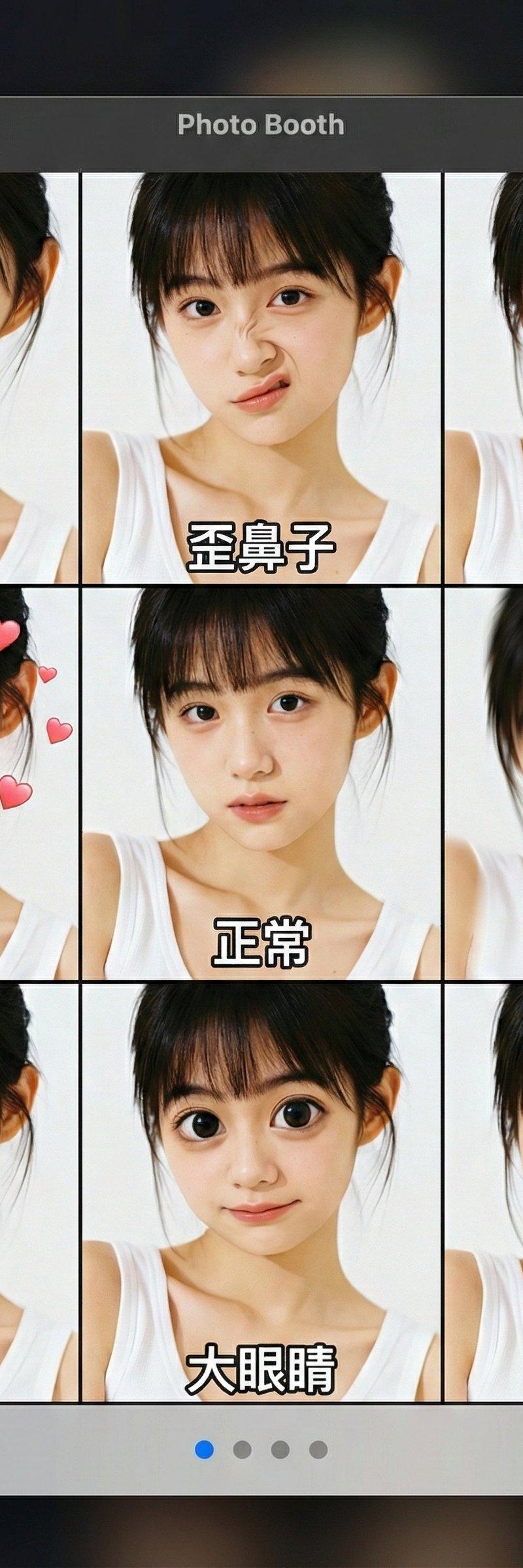
MacOS Photo Booth表情玩法复刻
提示词
😄嘿嘿!
今日复刻一个Apple 自带PhotoBooth的玩法,直接上传你
的照片,就会生成9宫格的搞怪表情哈哈~
😍天天看美女不腻么?来点不同的玩法啊~
🇨🇳中文Prompt:
一个完整的MacOS Photo Booth应用程序界面截图,顶部标题栏显示 "Photo Booth"。主窗口是一个9宫格布局,每个格子都显示着用户上传的人物,但应用了不同的滑稽效果。每个格子的底部都有白色中文字幕:
第一排:外星人、歪鼻子、花栗鼠
第二排:热恋、正常、头晕
第三排:笨蛋、大眼睛、青蛙
底部是带有左右箭头、四个导航点(第一个蓝色)和 "效果" 按钮的灰色控制栏。背景是深色且模糊的。
🇺🇸English Prompt:
A complete screenshot of the MacOS Photo Booth application interface, with the top title bar displaying "Photo Booth". The main window has a 9-grid layout, and each grid shows a user-uploaded person with different funny effects applied. At the bottom of each grid, there are white Chinese subtitles: First row: Alien, Crooked Nose, Chipmunk; Second row: Madly in Love, Normal, Dizzy; Third row: Fool, Big Eyes, Frog. At the bottom is a gray control bar with left and right arrows, four navigation dots (the first one is blue), and an "Effects" button. The background is dark and blurred.
- 分类
- 真实摄影
- 模型
- Unknown
- 来源作者
- Berryxia.AI
- 原始语言
- zh-CN
- 来源 ID
- macos-photo-booth-funny-effects-recreation
浏览量0