20

风格化肖像与壁画
Enlarge

Example images

风格化肖像与壁画

Prompt
Stylized Portrait with Mural
PROMPT👇🏻
Transform this image [Upload Your Image] into a 64K DSLR shot resolution of A medium-shot portrait of a beautiful young woman (same face as the uploaded image) standing in front of a mural. She is looking directly at the camera with a soft, confident smile. Her hands are raised to her head, lightly touching her hair. She has a warm complexion and polished makeup with rosy cheeks and a mauve lip color. Her hair is styled in a voluminous, messyA vertical 3-panel photo collage of the same woman(use the uploaded image reference the face), soft aesthetic photography style.
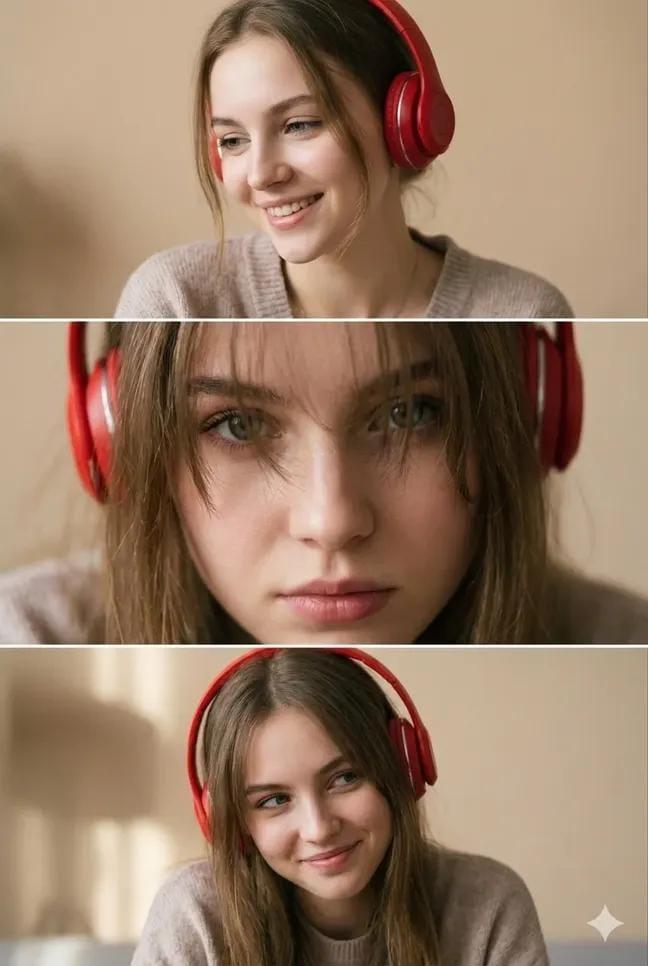
Top panel: girl wearing red over-ear headphones, slightly turned sideways, natural smile, eyes looking down, candid vibe.
Middle panel: extreme close-up portrait, messy bangs partially covering eyes, intense eye contact with camera, lips slightly parted, moody expression, cinematic depth.
Bottom panel: half-body portrait, head slightly tilted, shy playful smile, eyeslooking sideways, relaxed shoulders.
Soft indoor lighting, warm beige background, subtle film grain, pastel tones, low contrast, smooth skin texture, natural makeup, realistic facial details.
Vintage aesthetic, Pinterest-style collage, shallow depth of field, high-quality DSLR look, soft shadows, no harsh light, cozy atmosphere.
Quality: ultra-detailed, photorealistic,
No text, no watermark, no logo. The girl is wearing headphones in all three photos.
Category
Photography & Realism
Model
Unknown
Creator
Anissa
Source language
zh-CN
Views0
Source ID
stylized-portrait-with-mural
Studio

Guide

About "风格化肖像与壁画"

What is this prompt for?

"风格化肖像与壁画" AI image prompt for Unknown (Photography & Realism). Stylized Portrait with Mural PROMPT👇🏻 Transform this image [Upload Your Image] into a 64K DSL…

The full copyable prompt and example visuals above are ready for AI image generation or one-click recreate in Picva.

How to use this prompt

  1. Step 1

    Open the prompt detail

    Review the example visuals, category, and full prompt text for "风格化肖像与壁画".

  2. Step 2

    Copy the prompt

    Copy the prompt body from this page, or load it directly in Studio.

  3. Step 3

    Pick a model (Unknown)

    Prefer Unknown. If you switch models, keep subject and composition and tweak style terms.

  4. Step 4

    Generate and export

    Recreate the look in Picva, or export into your workflow for editing and publishing.

FAQ

What is the "风格化肖像与壁画" prompt?
It is an AI image-generation prompt for Unknown in the Photography & Realism category. This page includes the full prompt text, example visuals, and a one-click recreate path in Picva.
How do I use this prompt to generate an image?
Copy the prompt from this page, or use Generate / Studio. Paste it into a compatible image model, or recreate the look in Picva with optional reference images.
Which model is this prompt for?
This page lists Unknown. Most descriptive prompts also transfer to nearby image models such as GPT Image, Flux, or Midjourney with light style tweaks.
Can I use the result commercially?
You can usually copy the prompt for creation, but commercial use of the final image depends on the model terms, reference-image rights, and the generated content. Follow the source author and platform rules.

















