海报营销YouMindgpt-image-2posters-typography海报与排版
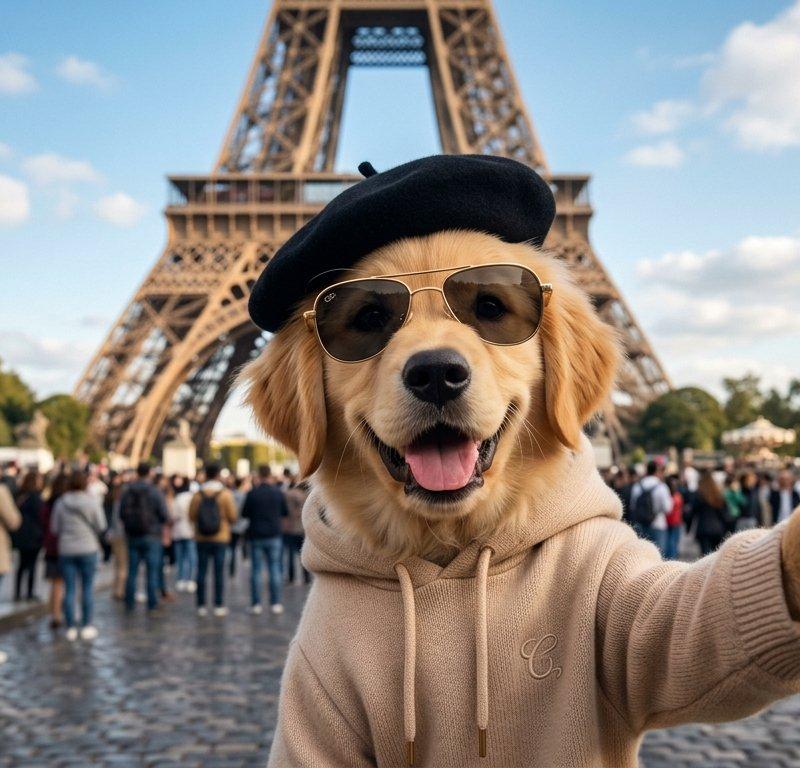
埃菲尔铁塔前的狗狗自拍
提示词
Create a photorealistic wide-angle travel selfie scene in Paris: an adorable golden retriever dog dressed like a stylish tourist stands in the foreground on a cobblestone plaza in front of the {argument name="landmark" default="Eiffel Tower"}, wearing a black French beret and a beige knit hoodie with drawstrings and a small embroidered monogram. The dog holds a gold iPhone-style smartphone at arm’s length in its right paw, camera lenses visible, as if taking a selfie. Place a large opaque medium-brown square directly over the dog’s face, centered from forehead to muzzle, hiding the facial features while leaving the ears, beret, hoodie, paw, and phone visible. The background shows a busy tourist crowd, outdoor café seating on the left, trees, and the landmark rising dramatically behind the subject, all with realistic depth of field and slight background blur. Use bright daytime lighting, blue sky with scattered fluffy clouds, natural colors, cinematic shallow focus, detailed fur texture, realistic paws, glossy phone reflections, and a polished social-media travel-photo composition. Add a subtle small watermark reading {argument name="watermark text" default="PIERRE_PUP_PARIS"} in the bottom-right corner. No extra text, no cartoon style, no distorted anatomy.- 分类
- 海报营销
- 模型
- GPT Image 2
- 来源作者
- Cherry 2.O
- 原始语言
- en
- 来源 ID
- 24341
- 发布时间
- 2026年6月5日
浏览量1323