14

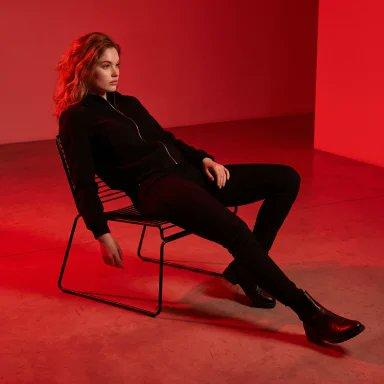
电影感红色影棚人像
Enlarge

Example images

电影感红色影棚人像

Prompt
Photo Of Me, Wearing A {argument name="outfit" default="Black Zip-up Jacket, Black Pants And Black Boots"}, Sitting Relaxed And Reclined On A {argument name="furniture" default="Modern Thin Metal-frame Chair"} In A Minimalist Studio. He Is Leaning Back With Legs Stretched Forward, One Hand Resting On The Chair Arm, The Other On His Thigh, Looking To The Side With A Calm Expression, Dramatic Full-scene {argument name="lighting" default="Red Lighting"}, Entire Background And Floor Bathed In Intense Saturated Red Color, High Contrast, Cinematic Studio Portrait, Smooth Seamless Red Backdrop, Moody Atmosphere, Fashion Photography Style, Sharp Details, Professional Lighting
Category
Photography & Realism
Model
GPT Image 2
Creator
Harboris
Views0
Source ID
25870
Published
Jun 16, 2026

Guide

About "电影感红色影棚人像"

What is this prompt for?

"电影感红色影棚人像" AI image prompt for GPT Image 2 (Photography & Realism). 一张大胆的单色红色影棚人像,具有极简主义的高级时尚美感,非常适合戏剧性的角色摄影。 Copy it on Picva and recreate the look in one cl…

The full copyable prompt and example visuals above are ready for AI image generation or one-click recreate in Picva.

How to use this prompt

  1. Step 1

    Open the prompt detail

    Review the example visuals, category, and full prompt text for "电影感红色影棚人像".

  2. Step 2

    Copy the prompt

    Copy the prompt body from this page, or load it directly in Studio.

  3. Step 3

    Pick a model (GPT Image 2)

    Prefer GPT Image 2. If you switch models, keep subject and composition and tweak style terms.

  4. Step 4

    Generate and export

    Recreate the look in Picva, or export into your workflow for editing and publishing.

FAQ

What is the "电影感红色影棚人像" prompt?
It is an AI image-generation prompt for GPT Image 2 in the Photography & Realism category. This page includes the full prompt text, example visuals, and a one-click recreate path in Picva.
How do I use this prompt to generate an image?
Copy the prompt from this page, or use Generate / Studio. Paste it into a compatible image model, or recreate the look in Picva with optional reference images.
Which model is this prompt for?
This page lists GPT Image 2. Most descriptive prompts also transfer to nearby image models such as GPT Image, Flux, or Midjourney with light style tweaks.
Can I use the result commercially?
You can usually copy the prompt for creation, but commercial use of the final image depends on the model terms, reference-image rights, and the generated content. Follow the source author and platform rules.