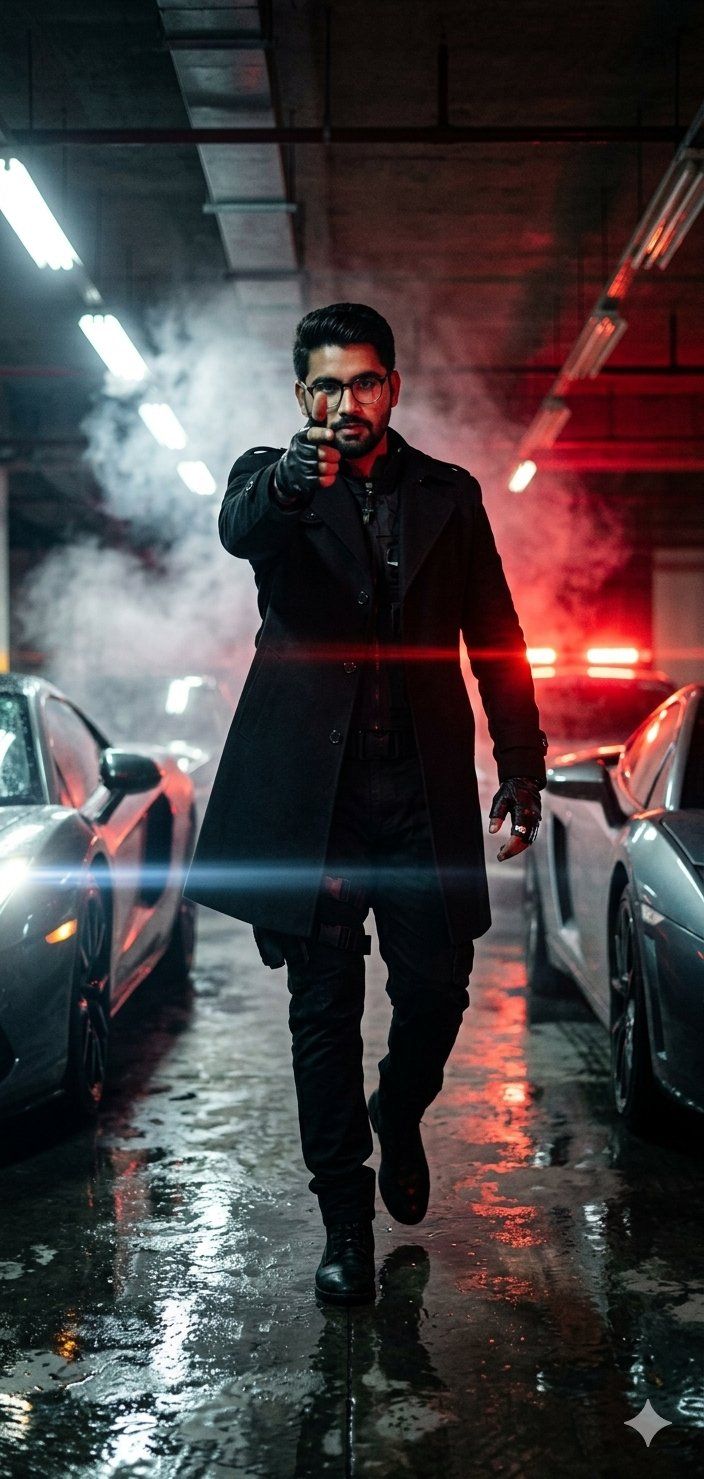
电影感停车场动作肖像
Prompt
A hyper-cinematic parking garage portrait, uploaded face as reference with 100% facial identity preservation, captured from an ultra-low floor-level camera angle between blurred luxury sports cars as the character walks directly toward the lens, wearing a {argument name="clothing" default="fitted black trench coat over a dark tactical outfit"} with silver rings and leather gloves, one hand making a {argument name="gesture" default="realistic finger-gun gesture"} aimed toward the camera like an intimidating warning, expression cold, fearless, and emotionally detached, harsh white fluorescent garage lights mixed with {argument name="lighting" default="deep red emergency lights"} flickering in the background, cinematic rainwater reflections covering the concrete floor, subtle smoke drifting through the frame, strong anamorphic lens flares streaking across the image, dramatic wide-angle distortion emphasizing dominance and power, deep shadows swallowing parts of the environment, shallow depth of field isolating the subject, realistic Kodak Portra 800 film grain, intense action-thriller atmosphere inspired by viral TikTok cinematic edits and neo-noir spy movies.- Category
- Photography & Realism
- Model
- GPT Image 2
- Creator
- Muhammad Jamil
- Source ID
- 26106
- Published
- Jun 18, 2026
Views0





![Create an epic premium automotive poster of [CAR MODEL]](https://whqgdndlpxjbwosvipip.supabase.co/storage/v1/render/image/public/prompt-source-media/promptsref/work-2474/image-1-8334e1421995e79a.png?width=800&quality=75&resize=contain)