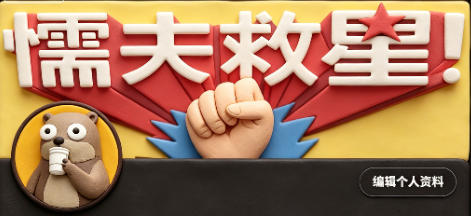
Claymation Social Banner
提示词
Create a wide 2:1 social media banner in a handcrafted claymation stop-motion style. Canvas size about 984×440 px, with a warm pastel yellow clay background and soft cinematic shadows. Center the composition around one huge raised clay fist emerging from behind a dark charcoal rounded rectangle strip across the bottom third. Behind the fist place one large red folded ribbon/banner shape spreading left and right, and one blue spiky burst shape directly behind the fist. At the top, add one oversized bold white 3D clay headline reading 懦夫救世!, with rounded puffy edges, slight red shadowing, and one red clay star used as the dot/accent near the final exclamation area. Add exactly one circular profile avatar at the lower left overlapping the dark bottom strip: a cute beige clay character with large googly eyes holding a small microphone, framed by a dark ring. Add exactly one rounded black button at the lower right with a thin light outline and small white Chinese text reading 编辑个人资料. Use soft polymer-clay texture everywhere, visible fingerprints, rounded handmade edges, macaroon warm colors, shallow depth of field, and realistic stop-motion lighting. Keep the layout clean and graphic, with exactly 5 main visible components: the white headline, the red ribbon, the central fist, the left circular avatar, and the right edit-profile button. No photorealistic skin, no flat vector look, no extra characters, no watermark.
- 分类
- 海报营销
- 模型
- GPT Image 2
- 来源作者
- Aiyutoushushu
- 来源 ID
- youmind-24169
浏览量1