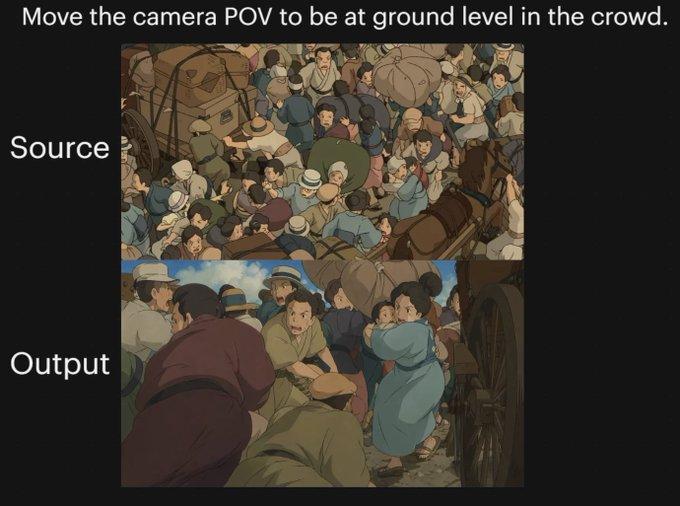
Anime cinematic comparison: GPT Image 2 prompt
提示词
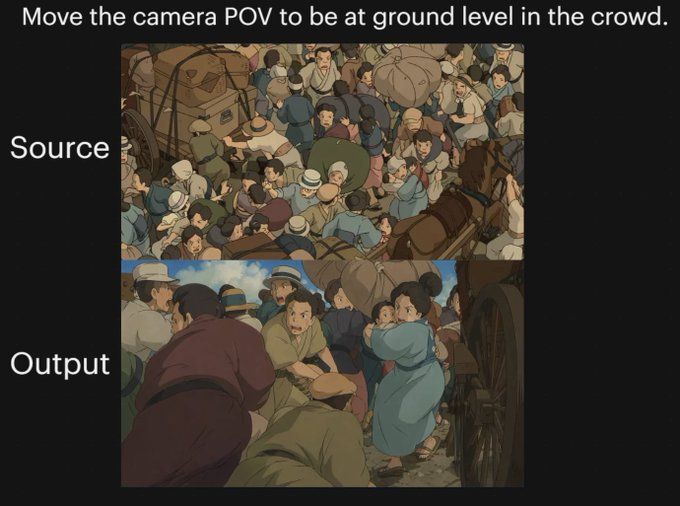
{"type":"comparison graphic","style":"anime cinematic demonstration image on a black presentation background","canvas":{"aspect_ratio":"4:3","background":"solid black"},"text_elements":[{"text":"{argument name=\"headline text\" default=\"Move the camera POV to be at ground level in the crowd.\"}","position":"top center","style":"large white sans-serif"},{"text":"Source","position":"left of upper image","style":"large white sans-serif"},{"text":"Output","position":"left of lower image","style":"large white sans-serif"}],"layout":{"sections":[{"title":"Source","position":"upper center","count":1,"labels":["overhead crowd scene"]},{"title":"Output","position":"lower center","count":1,"labels":["ground-level crowd POV scene"]}],"image_frames":2},"images":[{"role":"source image","composition":"busy top-down view of a densely packed historical street crowd, seen from above","scene":"a chaotic crowd gathered around a wagon and a horse-drawn carriage, people pressed shoulder to shoulder, many wearing caps and muted early-20th-century or old-European clothing, bundles and sacks visible, one brown horse at the right edge, wooden wagon wheel and cart structure partially visible","camera":"high overhead bird's-eye angle looking down into the crowd","lighting":"soft daylight","color_palette":"muted earthy browns, dusty blues, beige, olive, warm gray","rendering":"hand-painted anime film still, detailed crowd illustration, slightly soft shading"},{"role":"output image","composition":"the same crowded historical street reimagined from inside the mass of people at near-ground height","scene":"view from within the crowd beside a carriage wheel, bodies filling the foreground and midground, a person in dark maroon clothing bent forward at left, a crouched figure in green near the bottom center, a woman in a light blue dress at right-center turning back, tightly packed figures, horse and cart implied nearby, dramatic sense of compression and closeness","camera":"very low ground-level POV from inside the crowd, upward and forward through people, emphasizing complex occlusion and depth","lighting":"soft daylight with warm cinematic shadows","color_palette":"muted earthy browns, dusty blues, beige, olive, warm gray","rendering":"hand-painted anime film still, cinematic perspective shift, detailed character crowding, soft painterly shading"}],"overall_goal":"show a before-and-after camera angle transformation of the same anime crowd scene, with the output moving from an overhead view to a low immersive POV inside the crowd"}- 分类
- 图表信息图
- 模型
- GPT Image 2
- 来源作者
- chesnyfcb
- 来源 ID
- awesome-comparison-71
- 发布时间
- 2026年4月29日
浏览量0