Apple vision Pro🫦🫵掌控你真正的AR世界🌎 { "prompt": "Highly detailed photorealistic s
提示词
Apple vision Pro🫦🫵掌控你真正的AR世界🌎

{
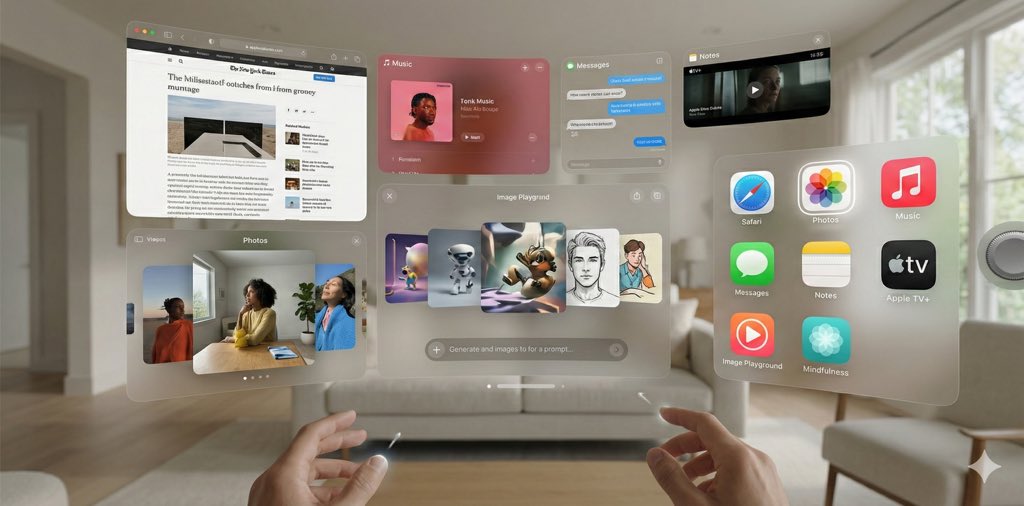
  "prompt": "Highly detailed photorealistic screenshot of Apple Vision Pro visionOS 26 operating interface from user's first-person immersive view, spatial computing home screen with multiple floating translucent glass-like 3D windows and volumetric app icons arranged in a customizable curved grid around the user, semi-transparent frosted blur material with subtle depth parallax and soft natural light reflections blending seamlessly with real-world passthrough surroundings, high-resolution micro-OLED display quality with ultra-sharp details, vibrant clean Apple minimalist UI design with rounded corners and volumetric glow, eye-tracking selection with subtle white glow highlight on hovered app icon (e.g., Photos app icon hovered), visible hand gesture pointers in lower field of view ready for pinch/tap/drag interactions, Digital Crown subtly visible on the right side for immersion control, open floating windows showing active apps: one large Safari browser window with tabs and webpage content, one Photos app window displaying spatial photos with depth, one Music app window with album artwork, one Messages window with conversation bubbles, one Notes window open, one Apple TV+ window playing immersive video preview, one Image Playground app window open showing text prompt input field at bottom with generated spatial images floating above in styles like Animation/Sketch/Illustration, one Mindfulness app window with breathing guide, subtle volumetric shadows and light bounce from virtual elements onto real environment, photorealistic rendering with cinematic soft ambient lighting, no distortion or artifacts, aspect ratio 2:1 wide immersive format",
  "negative_prompt": "blurry, low resolution, distorted text or UI elements, cartoonish, illustration style, flat 2D look, no depth or parallax, harsh shadows, overexposed, underexposed, watermark, logo overlay, people visible wearing headset, external device view, crowded cluttered screen, deformed windows or icons, missing hand pointers, no glow on hovered icons, explicit text prompts in Image Playground, vulgar content",
  "parameters": {
    "style": "Photorealistic visionOS 26 interface screenshot from inside the headset, Apple Human Interface Guidelines compliant, futuristic spatial UI with multiple open apps including Image Playground",
    "recommended_tool": "Midjourney, Stable Diffusion XL, Flux or advanced photoreal models",
    "aspect_ratio": "2:1 or 16:9 for wide spatial feel",
    "additional_tips": "Use weights like (floating translucent windows:1.4), (volumetric app icons:1.3), (Image Playground open with generated images:1.2), (soft natural passthrough lighting:1.1); vary open apps for diversity, include Apple Intelligence features like Image Playground prominently"
  }
}- 分类
- 创意图片
- 模型
- Nano Banana Pro
- 来源作者
- Pixshop
- 来源 ID
- b9bad161-ef0c-432a-8c06-4cbff0695f0e
- 发布时间
- 2026年1月7日
浏览量8