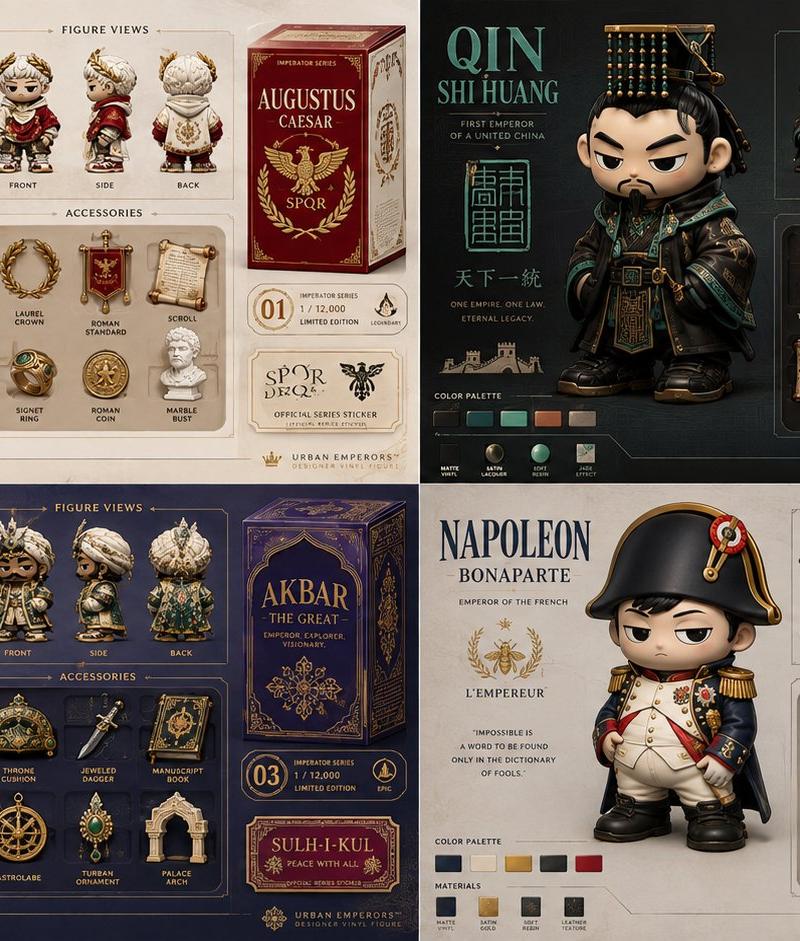
2x2 网格,16:9,为 4 位著名皇帝执行此操作:system_role: infer(render_role from "designer...
提示词
2x2 网格,16:9,为 4 位著名皇帝执行此操作:system_role: infer(render_role from "designer_toy_model_sheet_presentation" + {$subject}) [subject / topic] + [urban vinyl collectible character system] + [street-luxe fashion-toy aesthetic] + [multi-view collector sheet with hero render, orthographic views, accessory tray, packaging callouts, colorway chips, edition marks] + [matte vinyl, soft resin accents, premium toy documentation board] - [generic turnaround sheet] - [flat technical boringness] - [photoreal fashion photography] - [messy toy clutter] = [luxury blind-box concept board] input_binding { subject_identity : "{$subject}" character_core : infer(toy persona from subject_identity) attitude_signal : infer(lazy cool / sly rebellion / antihero cuteness / bored swagger from subject_identity) style_subculture : infer(skate / streetwear / sneaker / music-scene / city-night / underground-design cues) accessory_set : infer(3-6 collectible accessories from subject_identity + style_subculture) packaging_theme : infer(box graphics, icons, edition badge, warning stripe motif, sticker system) color_family : infer(primary, secondary, accent, chase_variant colors) } canvas { aspect_ratio : "4:5 or square" composition : "collector presentation board" reading_order : "hero render -> side/front/back views -> accessory tray -> packaging details" } layout_engine { panel_1 : "large central hero figure in slouched or anti-pose stance" panel_2 : "front / side / back miniature orthographic views" panel_3 : "accessory tray with molded insert layout" panel_4 : "mini blind-box packaging art, logo area, edition stamp, rarity badge" panel_5 : "color chips, material swatches, tiny design notes" } figure_language { shape : "chunky urban vinyl silhouette, oversized head, compact torso, simplified limbs" gesture : "slouched, leaning, shrugging, hands-in-pocket, seated-on-air, or subtle kick-forward pose" expression : "minimal deadpan, sleepy defiance, detached mischief, half-bored swagger" fashion_layer : infer(simplified streetwear silhouettes, puffy forms, oversized proportions, urban utility details) } material_system { body : "soft matte vinyl" accents : infer(satin resin, translucent charm, rubberized accessory, glossy enamel badge) finish : "premium toy-production finish with tight paint masks and soft studio reflections" } graphic_layer { call_outs : "clean product callouts, edition labels, accessory captions, rarity icon" typography : "minimal boutique collector typography" design_notes : "tiny layout labels only, no long paragraphs" background : "light studio gradient or paper-board presentation field" } lighting { style : "clean softbox product lighting with slightly elevated editorial contrast" shadows : "soft and tidy, suitable for product documentation" } output_contract { produce a richly detailed multi-view designer-toy presentation board for {$subject}. show a premium urban vinyl collectible with model-sheet clarity, accessory tray logic, blind-box packaging cues, and fashion-forward street-luxe styling. maintain a chunky stylized silhouette, matte vinyl materiality, and collector-market sophistication. ai should infer the persona, subculture details, accessory system, and packaging flavor. }- 分类
- 创意图片
- 模型
- GPT Image 2
- 来源作者
- @Gdgtify
- 原始语言
- zh-CN
- 来源 ID
- 2085840910697324847
- 发布时间
- 2026年8月8日
浏览量0