图表信息图YouMindgpt-image-2charts-infographics
日系 AI 创意工具海报
提示词
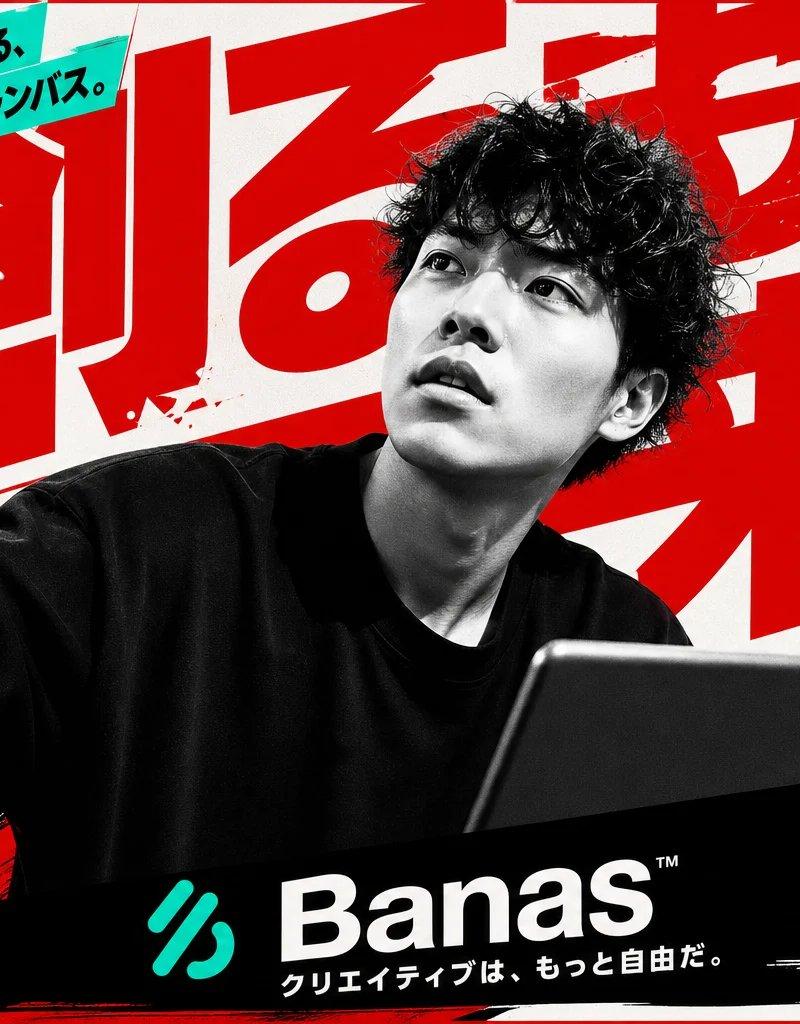
Goal: Create a bold Japanese advertising poster for a next-generation AI creative canvas tool called {argument name="brand name" default="Banas"}, with an aggressive high-contrast magazine/landing-page aesthetic.

Canvas: Horizontal 16:9 poster, off-white paper background with red ink splatters, black brush strokes, and a thin red border. Use a limited palette of black, white, vivid red, and turquoise.

Main subject: Center foreground shows a black-and-white photographic young male creator with curly dark hair, wearing an oversized black T-shirt. His face is intentionally hidden by a centered rectangular gray blur/mosaic block. His left arm is raised toward the viewer holding a stylus or pen as if drawing in midair, and his right hand holds a large dark tablet angled upward in the lower right. The figure should be dramatic, cropped large, and partially overlap all typography.

Layout and typography: Fill the background with enormous slanted red Japanese headline characters, partially cropped and layered behind the person, reading {argument name="main headline" default="創る力"}. Along the far left edge place a tall vertical black Japanese slogan reading {argument name="left slogan" default="創造力を解き放て"}. At top left, place a turquoise diagonal banner with bold black text reading {argument name="top banner text" default="AIで広がる、無限のキャンバス。"}. Use heavy Japanese gothic fonts, oversized lettering, diagonal underlines, rough ink textures, and energetic poster composition.

Text and callouts: Include exactly 6 promotional callout areas: 1 turquoise diagonal top-left banner; 1 white boxed callout in the upper right with red header text and black body copy; 1 turquoise circular badge on the right advertising a free trial; 1 bold right-side slogan block with red underline accents; 1 black rectangular feature block in the lower right with small turquoise icons; and 1 black bottom brand bar. The upper-right box should read in Japanese: 「プロも初心者も使える次世代キャンバスツール! 今すぐ、あなたのアイデアを解き放とう!」. The turquoise circle should read: 「今だけ!7日間無料トライアル実施中!!」. The right slogan should read: 「描く、デザインする、生み出す。すべてがここに。」. The lower-right black block should read: 「インスピレーションを止めない。最先端のクリエイティブ環境を今すぐ体験!」.

Left feature stack: Create exactly 3 small feature rows on the lower left, each with a black circular icon, a red label strip, and small black description text. The 3 rows are: 1) brush icon, label 「ブラシ無限大!」, description 「リアルもイラストも思いのまま。」; 2) layered-squares icon, label 「レイヤー自由自在!」, description 「直感操作で思い通りの表現を。」; 3) robot icon, label 「AIアシスト搭載!」, description 「アイデアをカタチにする最強の相棒。」.

Bottom branding: Add one wide black brush-stroke rectangle across the bottom center containing a turquoise abstract logo mark, the large white wordmark {argument name="brand name" default="Banas"} with a tiny ™, and the Japanese tagline 「クリエイティブは、もっと自由だ。」. At bottom right, add a search-bar style box containing 「バナス」 and a magnifying glass icon, with the URL 「banas.app」 below it.

Icon counts: Include exactly 3 black circular feature icons on the lower left and exactly 5 small turquoise circular icons inside the lower-right black feature block, representing creative tools such as image, document, palette, collaboration, and gallery. Do not add extra icons.

Style constraints: Make it look like a polished Japanese tech startup advertisement generated from text only, combining realistic monochrome photography, halftone grain, distressed print texture, bold red brush typography, and clean turquoise accent shapes. Keep all Japanese text crisp and legible except for the intentionally face-blurred subject.- 分类
- 图表信息图
- 模型
- GPT Image 2
- 来源作者
- 塚本 賢志 / Kenshi Tsukamoto
- 原始语言
- en
- 来源 ID
- 24506
- 发布时间
- 2026年6月6日
浏览量19.6万