14

编辑角度参考表
Enlarge

编辑角度参考表

Prompt
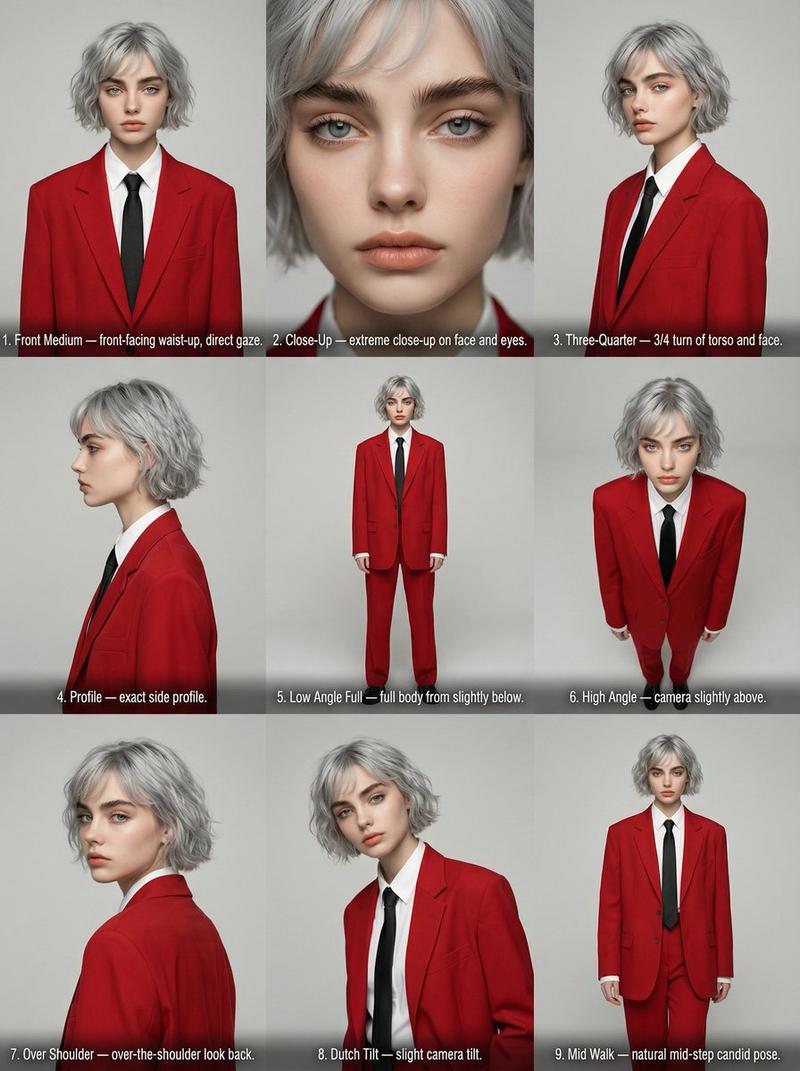
High-resolution Editorial Angle Reference Sheet. Perfect 3x3 grid. Aspect ratio 4:5. Strictly use attached selfie as identity reference. Maintain 100% facial consistency across all 9 panels (same face, age, hair, skin tone, proportions). Wardrobe (fixed for all panels): Oversized red suit jacket and trousers, white dress shirt, black necktie. Clean editorial oversized fit. Background: neutral light-grey studio cyclorama. Lighting: soft professional studio lighting with subtle fill. Camera: 85mm portrait look, shallow depth of field, sharp focus on face and outfit. Composition: centered subject in every cell, consistent framing, balanced spacing. Grid labels: clean white sans-serif text at bottom center of each cell showing the angle. Row 1 (Top): 1. Front Medium — front-facing waist-up, direct gaze. 2. Close-Up — extreme close-up on face and eyes. 3. Three-Quarter — 3/4 turn of torso and face. Row 2 (Middle): 4. Profile — exact side profile. 5. Low Angle Full — full body from slightly below. 6. High Angle — camera slightly above. Row 3 (Bottom): 7. Over Shoulder — over-the-shoulder look back. 8. Dutch Tilt — slight camera tilt. 9. Mid Walk — natural mid-step candid pose. Style: editorial fashion photography, cinematic, high-end. Render quality: ultra photorealistic, sharp text, visible fabric texture, natural skin, consistent lighting. Negative prompts: identity change, distorted anatomy, extra limbs, inconsistent clothing, busy background
Category
创意图片
Model
Nano Banana Pro
Creator
K
Views0
Source ID
8dc362e7-bcd1-48ff-8d03-e79e26810667
Published
Mar 8, 2026

Guide

About "编辑角度参考表"

What is this prompt for?

"编辑角度参考表" AI image prompt for Nano Banana Pro (创意图片). 一个针对 Google Nano Banana Pro 在 Gemini 上生成 3x3 图像网格(4:5 宽高比)的高度具体提示,要求在九个不同的编辑角度(例如,侧面、低角度、荷兰倾斜)展示一个单一主体。它强…

The full copyable prompt and example visuals above are ready for AI image generation or one-click recreate in Picva.

How to use this prompt

  1. Step 1

    Open the prompt detail

    Review the example visuals, category, and full prompt text for "编辑角度参考表".

  2. Step 2

    Copy the prompt

    Copy the prompt body from this page, or load it directly in Studio.

  3. Step 3

    Pick a model (Nano Banana Pro)

    Prefer Nano Banana Pro. If you switch models, keep subject and composition and tweak style terms.

  4. Step 4

    Generate and export

    Recreate the look in Picva, or export into your workflow for editing and publishing.

FAQ

What is the "编辑角度参考表" prompt?
It is an AI image-generation prompt for Nano Banana Pro in the 创意图片 category. This page includes the full prompt text, example visuals, and a one-click recreate path in Picva.
How do I use this prompt to generate an image?
Copy the prompt from this page, or use Generate / Studio. Paste it into a compatible image model, or recreate the look in Picva with optional reference images.
Which model is this prompt for?
This page lists Nano Banana Pro. Most descriptive prompts also transfer to nearby image models such as GPT Image, Flux, or Midjourney with light style tweaks.
Can I use the result commercially?
You can usually copy the prompt for creation, but commercial use of the final image depends on the model terms, reference-image rights, and the generated content. Follow the source author and platform rules.