19

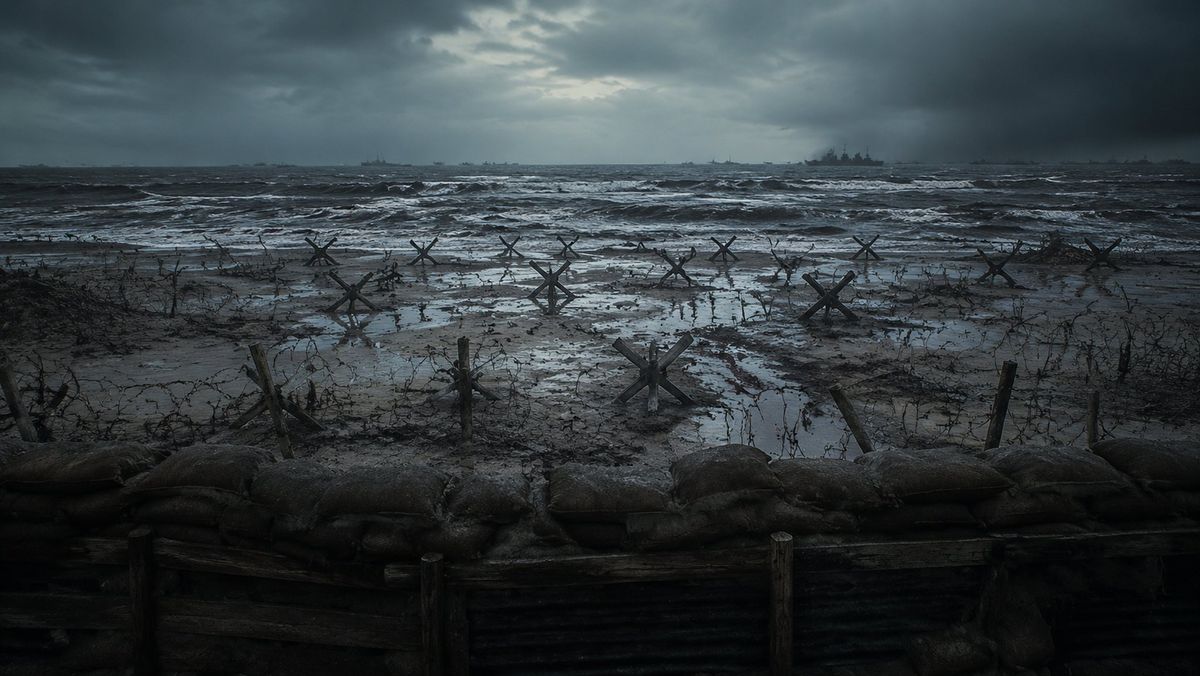
二战风暴海滩防御工事
Enlarge

二战风暴海滩防御工事

Prompt
Create a cinematic photorealistic wide shot of a bleak World War II beach invasion defense line viewed from inside a trench, with a low row of muddy sandbags and dark wooden trench planks across the entire foreground. Beyond the trench is a flooded, muddy beach covered in tangled barbed wire, broken stakes, puddles, and exactly 12 visible steel Czech hedgehog anti-tank obstacles scattered from left to right at varying distances. The ocean is rough and dark, with white-capped waves rolling toward shore, and several faint warship silhouettes on the horizon, including one larger battleship slightly right of center. The sky is heavy with storm clouds, with a dim cold break of light near the upper center. Use a desaturated blue-gray and charcoal color palette, gritty realism, wet reflective mud, misty sea spray, dramatic overcast lighting, high-detail cinematic composition, 16:9 aspect ratio, no people, no text, no modern objects. Emphasize the mood of {argument name="battlefield mood" default="grim, tense, abandoned before an amphibious assault"}, set on {argument name="location" default="a Normandy-style fortified beach"}, during {argument name="time of day" default="stormy dawn"}, with {argument name="visual style" default="photorealistic war film still"}.
Category
Photography & Realism
Model
GPT Image 2
Creator
刘仙升
Views0
Source ID
26456
Published
Jun 21, 2026

Guide

About "二战风暴海滩防御工事"

What is this prompt for?

"二战风暴海滩防御工事" AI image prompt for GPT Image 2 (Photography & Realism). 一个电影级写实提示词,用于生成阴郁的二战海滩防御场景,包含战壕、铁丝网、反坦克障碍物、汹涌的海面及远处的战舰。 Copy it on Picva and recreate the…

The full copyable prompt and example visuals above are ready for AI image generation or one-click recreate in Picva.

How to use this prompt

  1. Step 1

    Open the prompt detail

    Review the example visuals, category, and full prompt text for "二战风暴海滩防御工事".

  2. Step 2

    Copy the prompt

    Copy the prompt body from this page, or load it directly in Studio.

  3. Step 3

    Pick a model (GPT Image 2)

    Prefer GPT Image 2. If you switch models, keep subject and composition and tweak style terms.

  4. Step 4

    Generate and export

    Recreate the look in Picva, or export into your workflow for editing and publishing.

FAQ

What is the "二战风暴海滩防御工事" prompt?
It is an AI image-generation prompt for GPT Image 2 in the Photography & Realism category. This page includes the full prompt text, example visuals, and a one-click recreate path in Picva.
How do I use this prompt to generate an image?
Copy the prompt from this page, or use Generate / Studio. Paste it into a compatible image model, or recreate the look in Picva with optional reference images.
Which model is this prompt for?
This page lists GPT Image 2. Most descriptive prompts also transfer to nearby image models such as GPT Image, Flux, or Midjourney with light style tweaks.
Can I use the result commercially?
You can usually copy the prompt for creation, but commercial use of the final image depends on the model terms, reference-image rights, and the generated content. Follow the source author and platform rules.