16

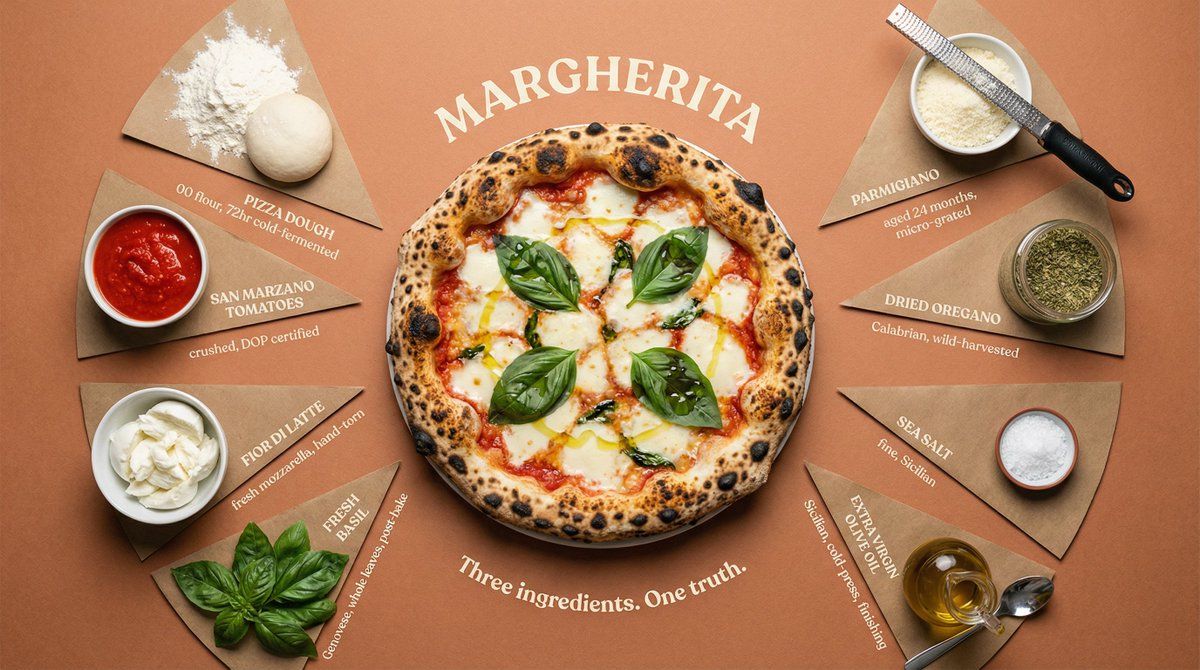
奢华食谱食材平铺信息图
Enlarge

奢华食谱食材平铺信息图

Prompt
Top-down flat lay of all {argument name="dish" default="DISH"} ingredients arranged in a perfect radial burst pattern, each in its own pie-slice section radiating from the center. Sections divided by thin hand-drawn lines. Final plated {argument name="dish 2" default="DISH"} in {argument name="vessel" default="VESSEL"} sits at the center, beautifully presented and steaming. Each ingredient labeled at outer edge in uppercase serif with small italic descriptor below — "[INGREDIENT] / [quantity, preparation, origin]". Surface: {argument name="color" default="COLOR"} kraft paper, subtly aged. Overhead soft box lighting, zero harsh shadows, slight vignette pulling focus to center. Dish name curved around center circle like an engraving: "[DISH NAME]". Subtitle: "[TAGLINE]". Luxury cookbook editorial meets heritage restaurant poster. 4K overhead, tack sharp, warm film grain.
Category
创意图片
Model
Nano Banana Pro
Views0
Source ID
2027249a-70bb-4bf3-95cb-8bf4db56b144
Published
Mar 8, 2026

Guide

About "奢华食谱食材平铺信息图"

What is this prompt for?

"奢华食谱食材平铺信息图" AI image prompt for Nano Banana Pro (创意图片). 一个可定制的提示模板,用于生成食物食材的俯视平铺图像,食材呈放射状排列,设计风格类似于豪华食谱编辑或传统餐厅海报,带有技术注释和一个居中摆放的菜肴。 --- 从上方俯视,所有 {argument nam…

The full copyable prompt and example visuals above are ready for AI image generation or one-click recreate in Picva.

How to use this prompt

  1. Step 1

    Open the prompt detail

    Review the example visuals, category, and full prompt text for "奢华食谱食材平铺信息图".

  2. Step 2

    Copy the prompt

    Copy the prompt body from this page, or load it directly in Studio.

  3. Step 3

    Pick a model (Nano Banana Pro)

    Prefer Nano Banana Pro. If you switch models, keep subject and composition and tweak style terms.

  4. Step 4

    Generate and export

    Recreate the look in Picva, or export into your workflow for editing and publishing.

FAQ

What is the "奢华食谱食材平铺信息图" prompt?
It is an AI image-generation prompt for Nano Banana Pro in the 创意图片 category. This page includes the full prompt text, example visuals, and a one-click recreate path in Picva.
How do I use this prompt to generate an image?
Copy the prompt from this page, or use Generate / Studio. Paste it into a compatible image model, or recreate the look in Picva with optional reference images.
Which model is this prompt for?
This page lists Nano Banana Pro. Most descriptive prompts also transfer to nearby image models such as GPT Image, Flux, or Midjourney with light style tweaks.
Can I use the result commercially?
You can usually copy the prompt for creation, but commercial use of the final image depends on the model terms, reference-image rights, and the generated content. Follow the source author and platform rules.