16

温柔秋日情调混合媒体肖像海报提示
Enlarge

温柔秋日情调混合媒体肖像海报提示

Prompt
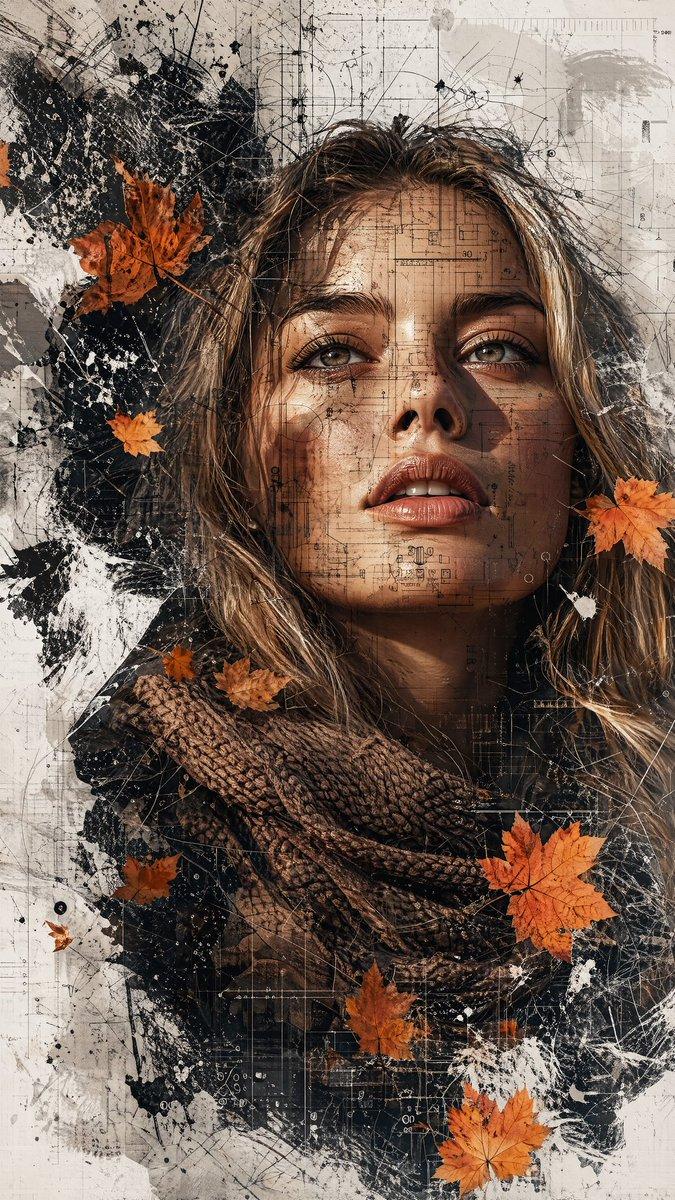
Highly -detailed artistic vertical portrait poster of a beautiful person [Use the uploaded image as reference] looking slightly upward, expressive brown eyes, soft natural makeup, loose brown hair strands, wearing a textured wool scarf. The portrait blends with abstract textures, autumn leaves, and splattered paint effects. Double exposure style with architectural line sketches, geometric overlays, and subtle blueprint elements integrated into the face. Warm autumn color palette (orange, brown, beige) mixed with neutral whites and dark shadows. Floating maple leaves around the composition. Modern graphic design poster layout with minimal typography, vertical title text on the side. High detail skin texture, cinematic lighting, sharp focus, creative collage composition, contemporary digital art, photorealistic mixed with sketch and grunge textures, 8k resolution, professional poster design, clean white background.
Category
创意图片
Model
Nano Banana Pro
Views1
Source ID
b41fb3f6-7317-46a8-904f-f67c0bf44025
Published
Mar 8, 2026

Guide

About "温柔秋日情调混合媒体肖像海报提示"

What is this prompt for?

"温柔秋日情调混合媒体肖像海报提示" AI image prompt for Nano Banana Pro (创意图片). 一个高度详细的提示,用于生成一幅具有柔和秋日氛围的艺术性竖版肖像海报。它将照片写实主义(使用上传图像作为参考)与抽象纹理、双重曝光效果(建筑草图、几何叠加)以及温暖的秋季调色板相结合,从而形成…

The full copyable prompt and example visuals above are ready for AI image generation or one-click recreate in Picva.

How to use this prompt

  1. Step 1

    Open the prompt detail

    Review the example visuals, category, and full prompt text for "温柔秋日情调混合媒体肖像海报提示".

  2. Step 2

    Copy the prompt

    Copy the prompt body from this page, or load it directly in Studio.

  3. Step 3

    Pick a model (Nano Banana Pro)

    Prefer Nano Banana Pro. If you switch models, keep subject and composition and tweak style terms.

  4. Step 4

    Generate and export

    Recreate the look in Picva, or export into your workflow for editing and publishing.

FAQ

What is the "温柔秋日情调混合媒体肖像海报提示" prompt?
It is an AI image-generation prompt for Nano Banana Pro in the 创意图片 category. This page includes the full prompt text, example visuals, and a one-click recreate path in Picva.
How do I use this prompt to generate an image?
Copy the prompt from this page, or use Generate / Studio. Paste it into a compatible image model, or recreate the look in Picva with optional reference images.
Which model is this prompt for?
This page lists Nano Banana Pro. Most descriptive prompts also transfer to nearby image models such as GPT Image, Flux, or Midjourney with light style tweaks.
Can I use the result commercially?
You can usually copy the prompt for creation, but commercial use of the final image depends on the model terms, reference-image rights, and the generated content. Follow the source author and platform rules.