{ "subject": { "description": "A feminine human presence shown only as a soft si
Prompt
{
 "subject": {
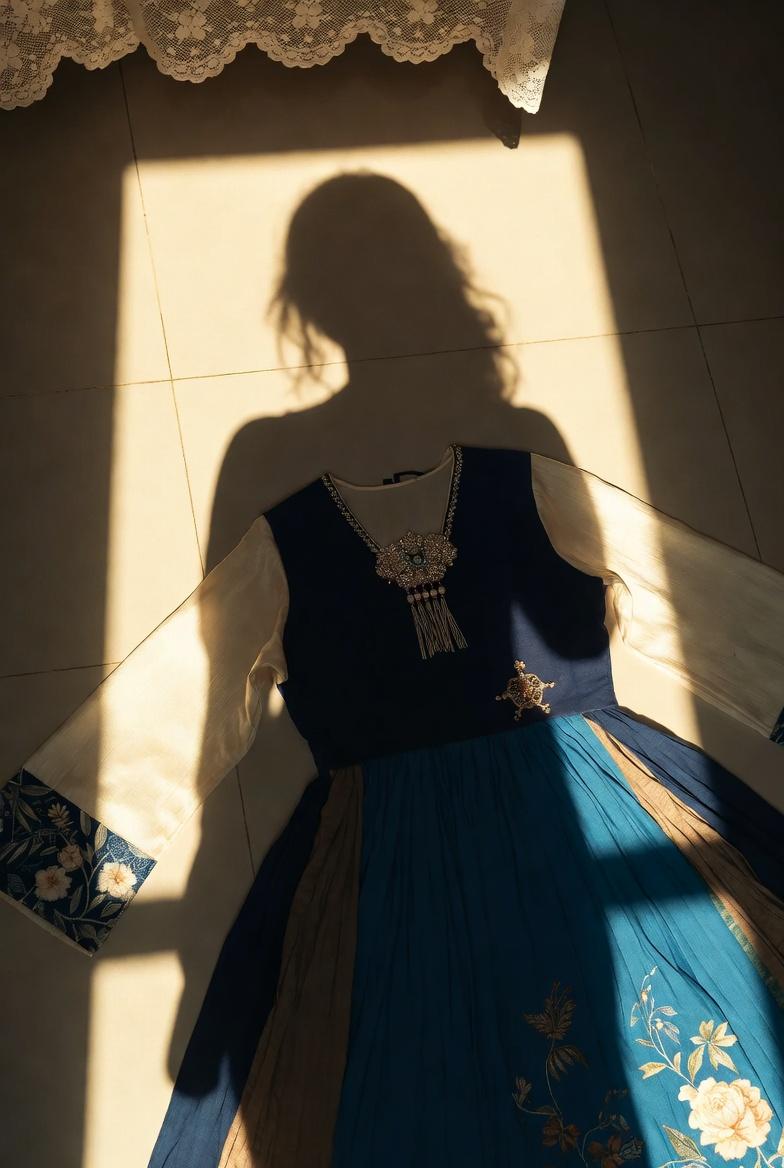
 "description": "A feminine human presence shown only as a soft silhouette shadow cast by warm sunlight, suggesting a long-haired woman standing indoors, her body absent yet strongly felt.",
 "age": "young adult",
 "expression": {
 "eyes": {
 "look": "not visible",
 "energy": "calm",
 "direction": "not visible"
 },
 "mouth": {
 "position": "not visible",
 "energy": "neutral"
 },
 "overall": "quiet, introspective presence implied through posture"
 },
 "face": {
 "preserve_original": true,
 "makeup": "not visible"
 },
 "hair": {
 "color": "dark",
 "style": "long, loose, slightly wavy silhouette",
 "effect": "soft shadow edges created by sunlight"
 },
 "body": {
 "frame": "slim, feminine silhouette",
 "waist": "defined",
 "chest": "subtly indicated through shadow",
 "legs": "not fully visible",
 "skin": {
 "visible_areas": "none, shadow only",
 "tone": "not visible",
 "texture": "not visible",
 "lighting_effect": "warm sunlight casting smooth shadow gradients"
 }
 },
 "pose": {
 "position": "standing, seen as a shadow on the floor",
 "base": "natural stance",
 "overall": "still and contemplative"
 },
 "clothing": {
 "top": {
 "type": "not worn, clothing placed on floor",
 "color": "navy blue and ivory",
 "details": "traditional-inspired patterns, wide sleeves, decorative collar ornament",
 "effect": "fabric catching light softly"
 },
 "bottom": {
 "type": "dress skirt portion",
 "color": "deep blue",
 "details": "floral embroidery and layered textures"
 }
 }
 },
 "accessories": {
 "jewelry": "ornamental pendant attached to the dress",
 "prop": "traditional-style dress laid flat on the floor"
 },
 "photography": {
 "camera_style": "smartphone photography aesthetic",
 "angle": "top-down view toward the floor with shadow entering frame",
 "shot_type": "environmental still life with human shadow",
 "aspect_ratio": "4:5",
 "texture": "natural, unfiltered, realistic",
 "lighting": "strong warm natural sunlight from a low angle",
 "depth_of_field": "deep focus, everything clearly visible"
 },
 "background": {
 "setting": "indoor room with tiled floor",
 "wall_color": "not visible",
 "elements": [
 "light-colored ceramic tiles",
 "lace fabric shadow near the top edge"
 ],
 "atmosphere": "quiet, warm, late-afternoon calm",
 "lighting": "golden sunlight creating long shadows"
 },
 "the_vibe": {
 "energy": "gentle and still",
 "mood": "intimate, reflective",
 "aesthetic": "sunlit minimalism with poetic absence",
 "authenticity": "feels like a real unposed moment",
 "intimacy": "private and personal",
 "story": "a moment before getting dressed, or after undressing, where light replaces the mirror",
 "caption_energy": "soft, understated, emotional"
 },
 "constraints": {
 "must_keep": [
 "human presence shown only as shadow",
 "warm natural sunlight",
 "dress laid flat on the floor",
 "indoor tiled setting"
 ],
 "avoid": [
 "visible face",
 "direct eye contact",
 "studio lighting",
 "posed fashion photography"
 ]
 },
 "negative_prompt": [
 "cartoon",
 "anime",
 "overexposed",
 "studio setup",
 "hard flash",
 "visible face",
 "text overlays",
 "watermark"
 ]
}- Category
- Architecture & Spaces
- Model
- grok-imagine/text-to-image
- Creator
- xie underwood
- Source language
- en
- Source ID
- 105
- Published
- Dec 29, 2025
Views53