16

竖屏 9:16,白色背景,极简穿搭指南排版。顶部左侧是大号黑体中文标题“低能量穿搭”,下方是英文“LOW-ENERGY”。左侧有三个黑色细线边框的商品清单框,展
Enlarge

竖屏 9:16,白色背景,极简穿搭指南排版。顶部左侧是大号黑体中文标题“低能量穿搭”,下方是英文“LOW-ENERGY”。左侧有三个黑色细线边框的商品清单框,展

Prompt
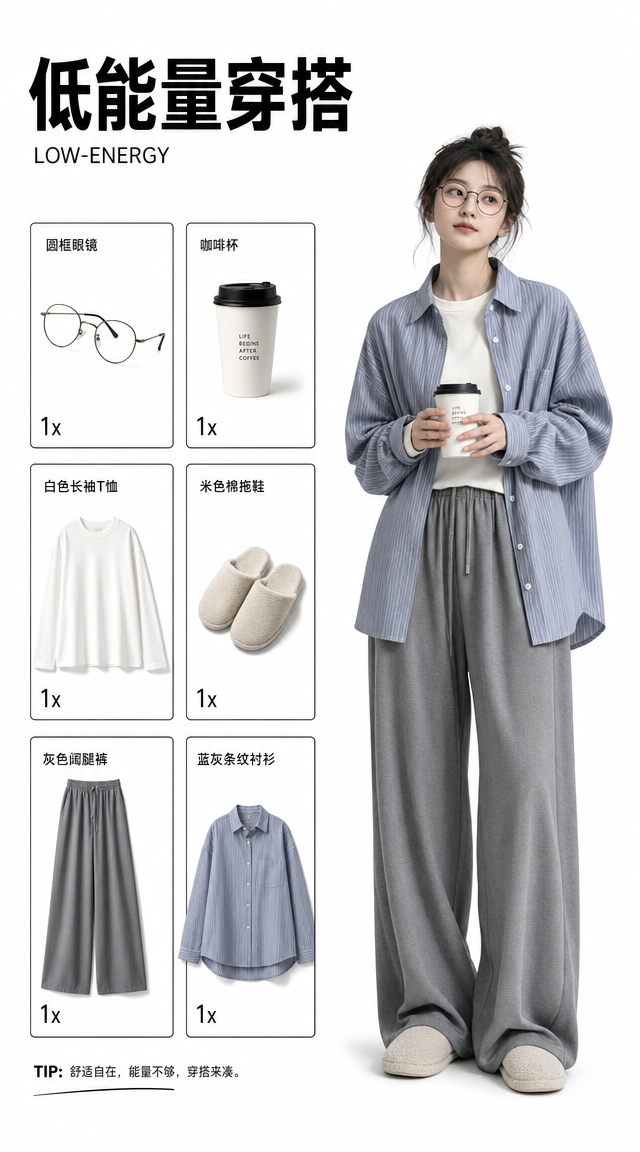
竖屏 9:16,白色背景,极简穿搭指南排版。顶部左侧是大号黑体中文标题“低能量穿搭”,下方是英文“LOW-ENERGY”。左侧有三个黑色细线边框的商品清单框,展示圆框眼镜、咖啡杯、白色长袖上衣、米色拖鞋、灰色宽松长裤、蓝灰条纹宽松衬衫,每个商品为白底抠图,并带有“1x”数量标识。右侧是一位年轻亚洲女生全身站立,戴眼镜,穿米色内搭、宽松蓝灰条纹衬衫、灰色宽腿裤和软底拖鞋,双手捧着杯子,神情安静放松。
Category
Posters & Typography
Model
GPT Image 2
Views424
Source ID
13709
Published
Jun 1, 2026

Guide

About "竖屏 9:16,白色背景,极简穿搭指南排版。顶部左侧是大号黑体中文标题“低能量穿搭”,下方是英文“LOW-ENERGY”。左侧有三个黑色细线边框的商品清单框,展"

What is this prompt for?

"竖屏 9:16,白色背景,极简穿搭指南排版。顶部左侧是大号黑体中文标题“低能量穿搭”,下方是英文“LOW-ENERGY”。左侧有三个黑色细线边框的商品清单框,展" AI image prompt for GPT Image 2 (Posters & Typography). 竖屏 9:16,白色背景,极简穿搭指南排…

The full copyable prompt and example visuals above are ready for AI image generation or one-click recreate in Picva.

How to use this prompt

  1. Step 1

    Open the prompt detail

    Review the example visuals, category, and full prompt text for "竖屏 9:16,白色背景,极简穿搭指南排版。顶部左侧是大号黑体中文标题“低能量穿搭”,下方是英文“LOW-ENERGY”。左侧有三个黑色细线边框的商品清单框,展".

  2. Step 2

    Copy the prompt

    Copy the prompt body from this page, or load it directly in Studio.

  3. Step 3

    Pick a model (GPT Image 2)

    Prefer GPT Image 2. If you switch models, keep subject and composition and tweak style terms.

  4. Step 4

    Generate and export

    Recreate the look in Picva, or export into your workflow for editing and publishing.

FAQ

What is the "竖屏 9:16,白色背景,极简穿搭指南排版。顶部左侧是大号黑体中文标题“低能量穿搭”,下方是英文“LOW-ENERGY”。左侧有三个黑色细线边框的商品清单框,展" prompt?
It is an AI image-generation prompt for GPT Image 2 in the Posters & Typography category. This page includes the full prompt text, example visuals, and a one-click recreate path in Picva.
How do I use this prompt to generate an image?
Copy the prompt from this page, or use Generate / Studio. Paste it into a compatible image model, or recreate the look in Picva with optional reference images.
Which model is this prompt for?
This page lists GPT Image 2. Most descriptive prompts also transfer to nearby image models such as GPT Image, Flux, or Midjourney with light style tweaks.
Can I use the result commercially?
You can usually copy the prompt for creation, but commercial use of the final image depends on the model terms, reference-image rights, and the generated content. Follow the source author and platform rules.