19

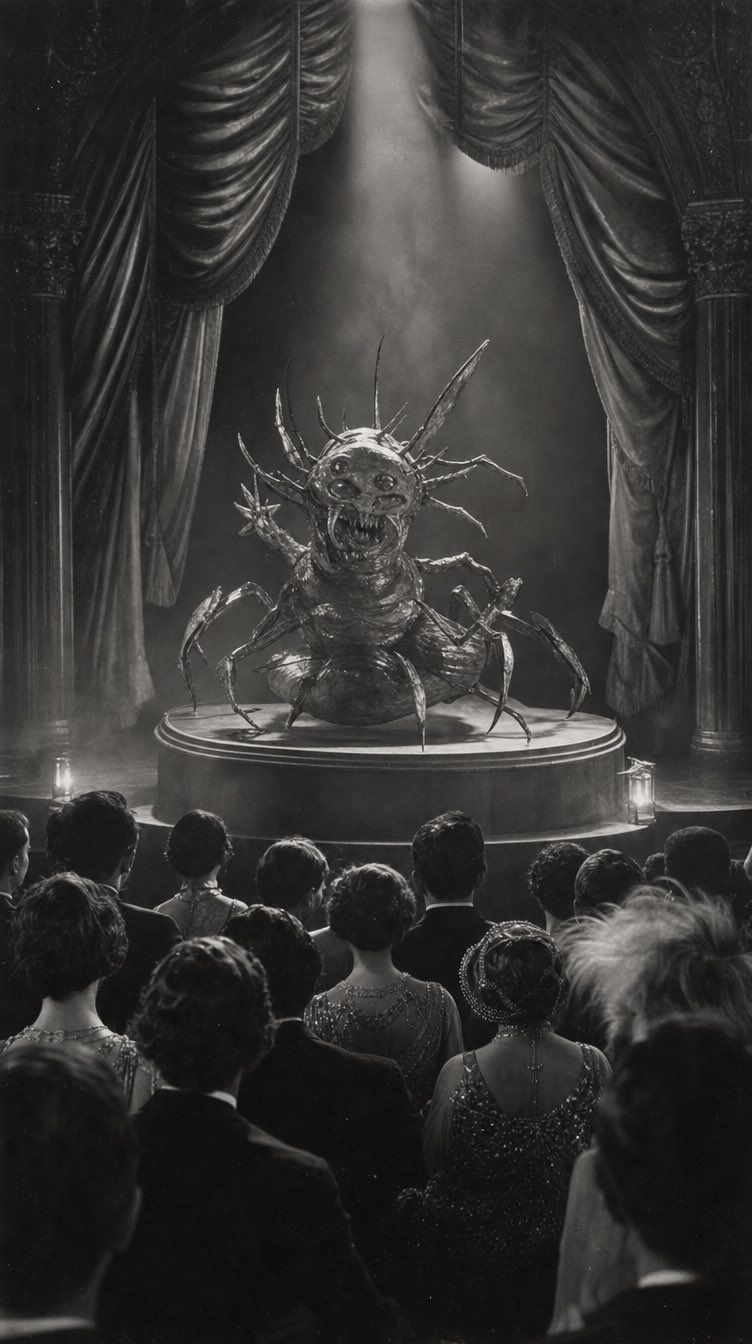
从草图到复古恐怖剧院场景
Enlarge

从草图到复古恐怖剧院场景

Prompt
Using the provided sketch as the composition and creature-design base, transform it into a finished cinematic scene: render the sketched monster as a realistic grotesque insect-spider stage creature on the same circular pedestal, keeping the central pose, multiple legs, spikes, open mouth, and domed display/stage concept. Change the rough notebook drawing into {argument name="visual style" default="dramatic black-and-white vintage horror photography"} with high contrast, film grain, smoky atmosphere, and a strong overhead spotlight. Replace the simple sketched arch with an ornate theater proscenium: exactly 2 tall side curtains, 2 carved side columns, and 2 small floor lanterns near the stage. Add a formal theater audience in the foreground, seen from behind, with exactly 20 visible spectators in period eveningwear watching the creature. Make the image vertical, like a staged performance photograph from {argument name="era" default="the 1930s"}. Keep the mood eerie, theatrical, and grand; do not include notebook paper, pencil lines, handwritten symbols, modern objects, or color.
Category
Photography & Realism
Model
GPT Image 2
Creator
Marcvs
Views0
Source ID
26555
Published
Jun 22, 2026

Guide

About "从草图到复古恐怖剧院场景"

What is this prompt for?

"从草图到复古恐怖剧院场景" AI image prompt for GPT Image 2 (Photography & Realism). 将粗糙的生物草图转化为一张充满戏剧性的黑白复古剧院照片,包含观众、幕布和聚光灯。 Copy it on Picva and recreate the look in one…

The full copyable prompt and example visuals above are ready for AI image generation or one-click recreate in Picva.

How to use this prompt

  1. Step 1

    Open the prompt detail

    Review the example visuals, category, and full prompt text for "从草图到复古恐怖剧院场景".

  2. Step 2

    Copy the prompt

    Copy the prompt body from this page, or load it directly in Studio.

  3. Step 3

    Pick a model (GPT Image 2)

    Prefer GPT Image 2. If you switch models, keep subject and composition and tweak style terms.

  4. Step 4

    Generate and export

    Recreate the look in Picva, or export into your workflow for editing and publishing.

FAQ

What is the "从草图到复古恐怖剧院场景" prompt?
It is an AI image-generation prompt for GPT Image 2 in the Photography & Realism category. This page includes the full prompt text, example visuals, and a one-click recreate path in Picva.
How do I use this prompt to generate an image?
Copy the prompt from this page, or use Generate / Studio. Paste it into a compatible image model, or recreate the look in Picva with optional reference images.
Which model is this prompt for?
This page lists GPT Image 2. Most descriptive prompts also transfer to nearby image models such as GPT Image, Flux, or Midjourney with light style tweaks.
Can I use the result commercially?
You can usually copy the prompt for creation, but commercial use of the final image depends on the model terms, reference-image rights, and the generated content. Follow the source author and platform rules.