19

梦幻日出场景与象征性阴影
Enlarge

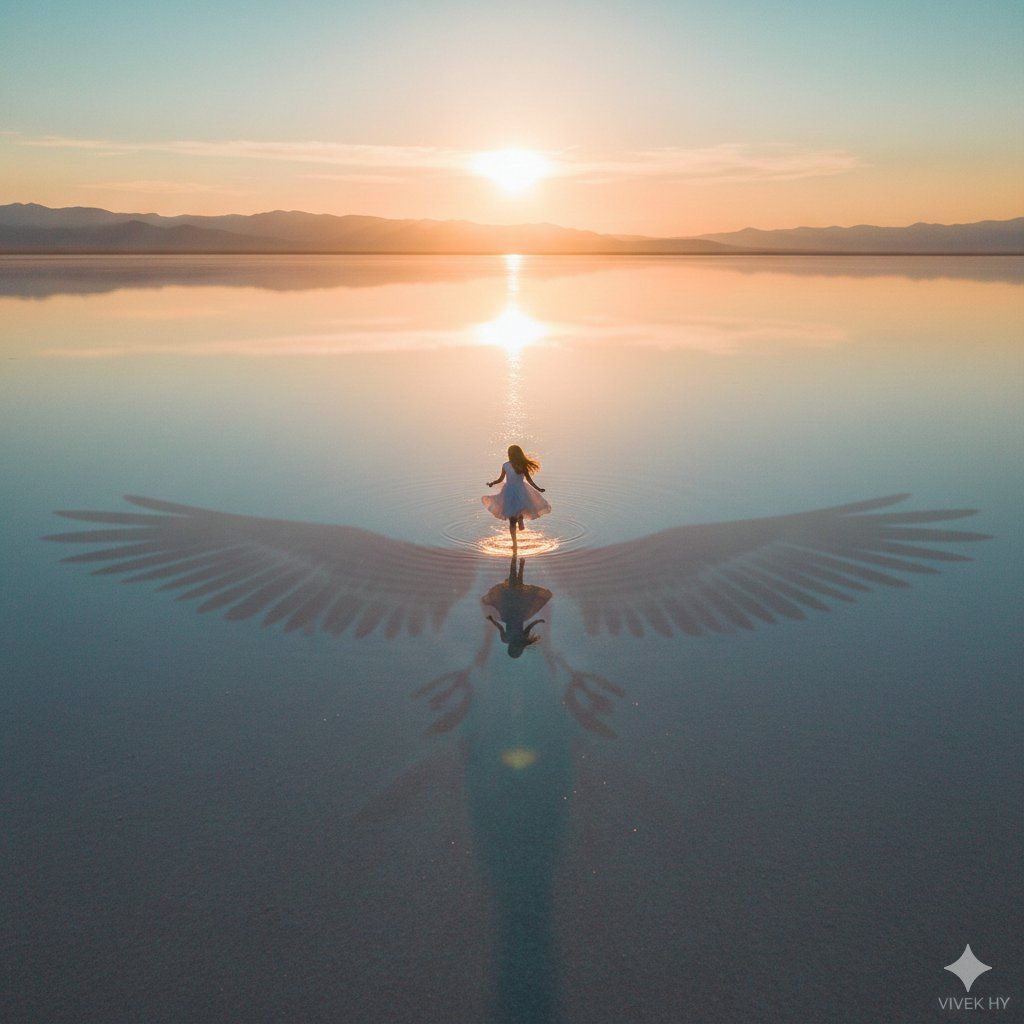
梦幻日出场景与象征性阴影

Prompt
{
  "scene": {
    "description": "a young girl running freely toward the rising sun on a vast reflective ground",
    "special_element": "her shadow forming large bird-like wings",
    "mood": "dreamy, hopeful, symbolic of freedom"
  },
  "environment": {
    "lighting": "soft golden sunrise breaking over the horizon",
    "colors": "warm orange, soft teal, gentle gradients across reflective surface",
    "atmosphere": "calm, wide open space with magical glow"
  },
  "visual_style": {
    "quality": "8K ultra-realistic",
    "tone": "cinematic, surreal realism",
    "texture": "smooth reflections with subtle ripples"
  },
  "composition": {
    "camera_angle": "high aerial view",
    "focus": "tiny running figure with large wing-shadow dominating foreground"
  },
  "signature": "{argument name="signature" default="VIVEK HY"}"
}
Category
创意图片
Model
Nano Banana Pro
Creator
Vivek HY
Views0
Source ID
e876a122-e475-4aee-b409-2b75d50199f1
Published
Mar 8, 2026

Guide

About "梦幻日出场景与象征性阴影"

What is this prompt for?

"梦幻日出场景与象征性阴影" AI image prompt for Nano Banana Pro (创意图片). 一个用于 Google Gemini Nano Banana Pro 的图像生成提示,创作一个超现实且充满希望的场景:一个小女孩奔向日出,她身后戏剧性的影子形成巨大的鸟状翅膀,以超现实、电影般的风格呈…

The full copyable prompt and example visuals above are ready for AI image generation or one-click recreate in Picva.

How to use this prompt

  1. Step 1

    Open the prompt detail

    Review the example visuals, category, and full prompt text for "梦幻日出场景与象征性阴影".

  2. Step 2

    Copy the prompt

    Copy the prompt body from this page, or load it directly in Studio.

  3. Step 3

    Pick a model (Nano Banana Pro)

    Prefer Nano Banana Pro. If you switch models, keep subject and composition and tweak style terms.

  4. Step 4

    Generate and export

    Recreate the look in Picva, or export into your workflow for editing and publishing.

FAQ

What is the "梦幻日出场景与象征性阴影" prompt?
It is an AI image-generation prompt for Nano Banana Pro in the 创意图片 category. This page includes the full prompt text, example visuals, and a one-click recreate path in Picva.
How do I use this prompt to generate an image?
Copy the prompt from this page, or use Generate / Studio. Paste it into a compatible image model, or recreate the look in Picva with optional reference images.
Which model is this prompt for?
This page lists Nano Banana Pro. Most descriptive prompts also transfer to nearby image models such as GPT Image, Flux, or Midjourney with light style tweaks.
Can I use the result commercially?
You can usually copy the prompt for creation, but commercial use of the final image depends on the model terms, reference-image rights, and the generated content. Follow the source author and platform rules.